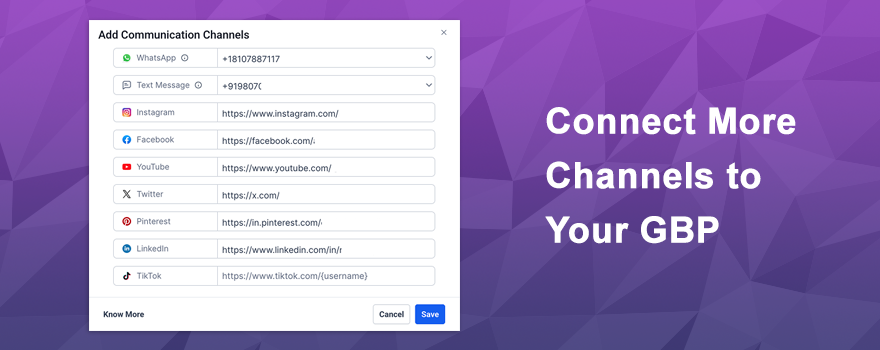
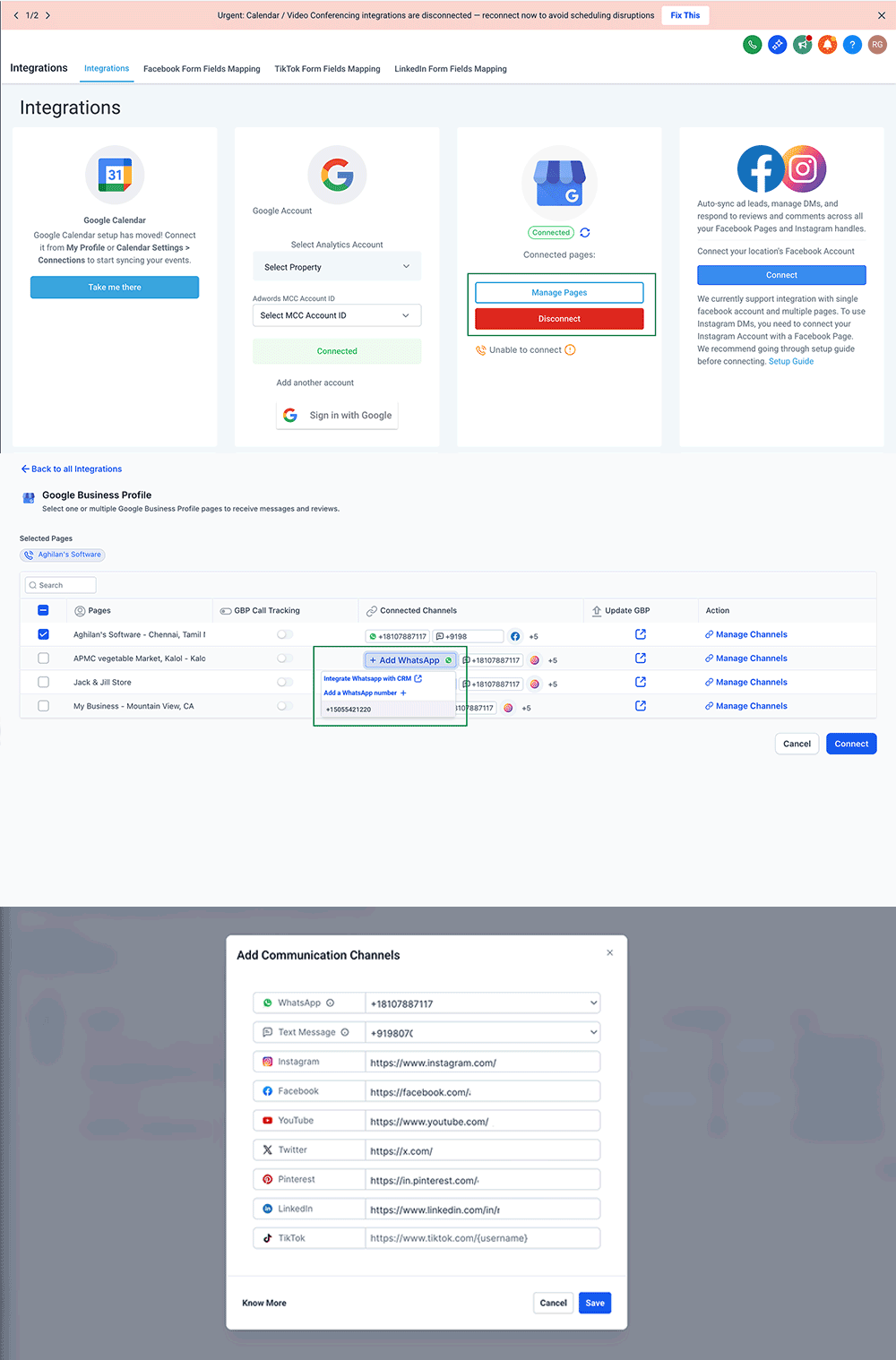
Your Google Business Profile just became a lot more connected. 🎉 You can now attach messaging channels like WhatsApp and Text/SMS, plus social profiles like Facebook, Instagram, LinkedIn, YouTube, TikTok, X, and Pinterest directly to your GBP pages. That means when customers find you on Google, they can reach out through the channels they already know and trust.
What’s New? 🚀
Two powerful channel types can now be linked to your Google Business Profile.
WhatsApp & Text/SMS messaging
- Add WhatsApp and Text contact numbers directly during the GBP connection flow
- Choose from CRM-integrated numbers via a simple dropdown for one-click selection
- Non-CRM numbers can still be added, though automations and sync won’t be available for those numbers
Social profile connections
Link your social media accounts directly to your GBP page. Supported platforms include:
- Facebook, Instagram, LinkedIn, YouTube, TikTok, X, and Pinterest
When customers search for your business on Google, they’ll see these channels right on your profile — making it easier than ever to connect.
How It Works 🛠️
Setting up your channels is quick and straightforward!
- Navigate to Settings → Integrations → Google Business Profile
- Select the GBP page you want to configure
- Under WhatsApp & Text, choose a CRM-connected number from the dropdown or enter a custom number
- Under Social Channels, click Connect/Manage to add or edit your social profile links
- Review your connected channels and hit Save
You can update or remove any channel anytime from the same screen.
A few things to keep in mind:
- Only CRM-connected numbers and social channels support message syncing and automation
- If both WhatsApp and Text numbers are added, Google prioritizes the Text number in search results — WhatsApp only displays if no Text number is present
- There may be a brief delay as Google reviews and approves your channel details before they go live
Why You’ll Love It 💡
This feature turns your Google Business Profile into a true engagement hub.
- Give customers the familiar channels they already prefer — WhatsApp, SMS, social media, and more
- Lower the friction to contact you, which means more conversations and more leads
- Keep messaging centralized in your CRM when using connected numbers
- Build higher trust and responsiveness by showing customers you’re reachable everywhere
- Stand out in search results with a fully connected, professional business profile
More ways to reach you means more opportunities to convert.
Ready to make your Google Business Profile work harder? Head to Settings → Integrations → Google Business Profile and start connecting your channels today! 🚀💬
What's your Reaction?
You have reacted on"Add Social Messaging Channels to GBP 💬"
A few seconds ago


 Subscriptions
 My Orders
 My Wishlist
 Refer & Earn💸
 My Projects
 Conversations
 Website Services
 New Website Request
 Website Addons
 eCommerce Addons
 eCommerce Modules
 Software Development
 Graphic Design
 Video Production
 Content Writing
 Marketing Services
 Marketing Products
 Get a Marketing Plan
 Local SEO Audit
 Sales Automation
 Service Automation
 Operations Automation
 Marketing Automation
 Payments Automation
 Premium Modules
 Support Tickets
 Latest Updates
 Consultation Calls
 Tools & Extensions
 Tech Tips & Tricks
 Domains & Emails