HTML colors, also known as HEXA codes is how colors are identified for the web.
Chances are you have already seen this on the back-end of your website or your favorite online software.
Why do I need to know this?
Sooner or later you will be asked what is the HTML color of your brand. This is usually asked anytime you hire a web designer, graphic designer or decide to do any print marketing.
Moreover you will most likely see this option on MOST software you use nowadays to customize the dashboard according to your brand.

If you know your brand’s HTML color, you can simply copy-paste the code instead of wasting time guessing from the chart/wheel.
How do I find out my Logo colors?
If Xtreme designed your Logo Design, we included a text file with the logo’s primary and secundary colors for your reference.
If we did not design your logo, you can use the method below.
How do I find out the HTML code of any color?
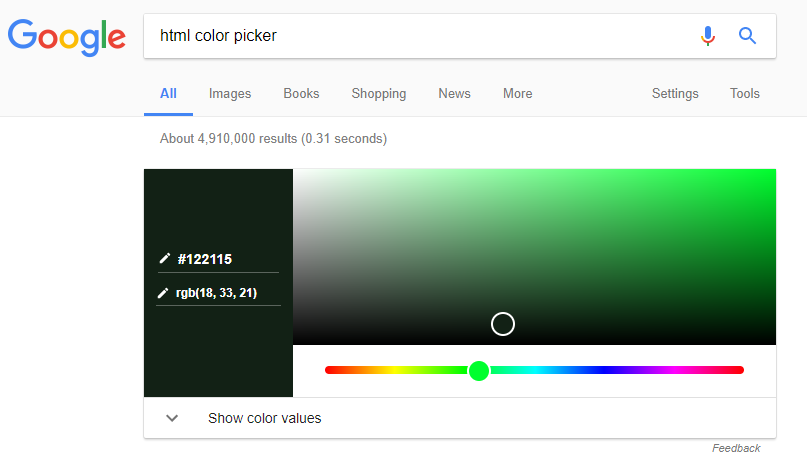
Simple type “html color picker” on google and you will be able to get the HTML code of any color you choose.
How do I find the HTML code of any image?
Now, if you see a color you like on any website, you can use a handy tool to point to the color you want and get the code instantly.
All you need to do is install the browser addon called Colorzilla.

Moreover they have a Chrome and Mozilla version as well.
> We use this browser addon on our business everyday, now you can use this trick next time you want to get colors on the go 😉


 Subscriptions
 My Orders
 My Wishlist
 Refer & Earn💸
 My Projects
 Conversations
 Website Services
 New Website Request
 Website Addons
 eCommerce Addons
 eCommerce Modules
 Software Development
 Graphic Design
 Video Production
 Content Writing
 Marketing Services
 Marketing Products
 Get a Marketing Plan
 Local SEO Audit
 Sales Automation
 Service Automation
 Operations Automation
 Marketing Automation
 Payments Automation
 Premium Modules
 Support Tickets
 Latest Updates
 Consultation Calls
 Tools & Extensions
 Tech Tips & Tricks
 Domains & Emails









