To set-up your mail with other email clients you will need the following info:
LOGIN INFO:
Username = [email protected]
Password = yourpassword
SERVER INFO:
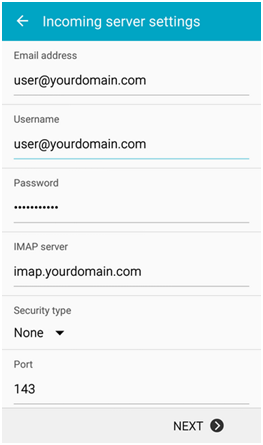
Incoming server = IMAP: imap.yourdomain.com
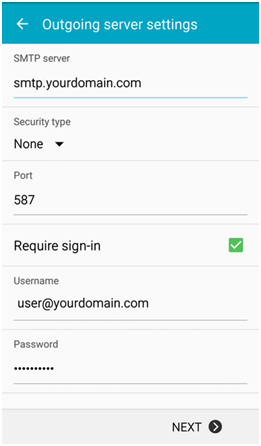
Outgoing server = SMTP: smtp.yourdomain.com
PS: If you are using an iPhone, note that instead of “Server” you will see “Host”. Also “SSL”needs to be off for incoming & outgoing servers
*Replace screenshot’s email and server info with your info above.
Step 1: Input the “Login Info” above Step 2: Choose “IMAP” for the Account Type
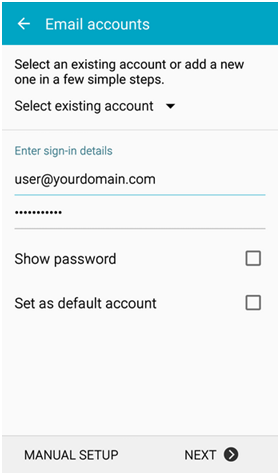
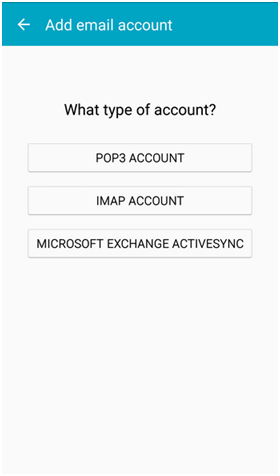
Step 3: Input the “Incoming” Server Info Step 4: Input the “Outgoing” Server Info
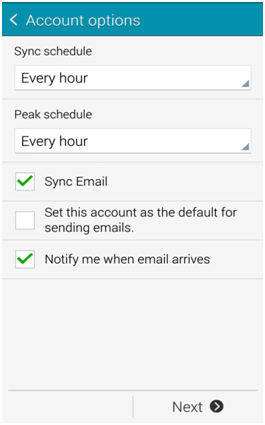
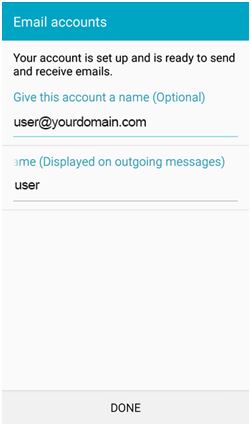
Step 5: Choose Syncing Options Step 6: Complete & Check Emails!
What's your Reaction?
You have reacted on"How to Setup Email on your Phone (Recommended)"
A few seconds ago


 Subscriptions
 My Orders
 My Wishlist
 Refer & Earn💸
 My Projects
 Conversations
 Website Services
 New Website Request
 Website Addons
 eCommerce Addons
 eCommerce Modules
 Software Development
 Graphic Design
 Video Production
 Content Writing
 Marketing Services
 Marketing Products
 Get a Marketing Plan
 Local SEO Audit
 Sales Automation
 Service Automation
 Operations Automation
 Marketing Automation
 Payments Automation
 Premium Modules
 Support Tickets
 Latest Updates
 Consultation Calls
 Tools & Extensions
 Tech Tips & Tricks
 Domains & Emails









