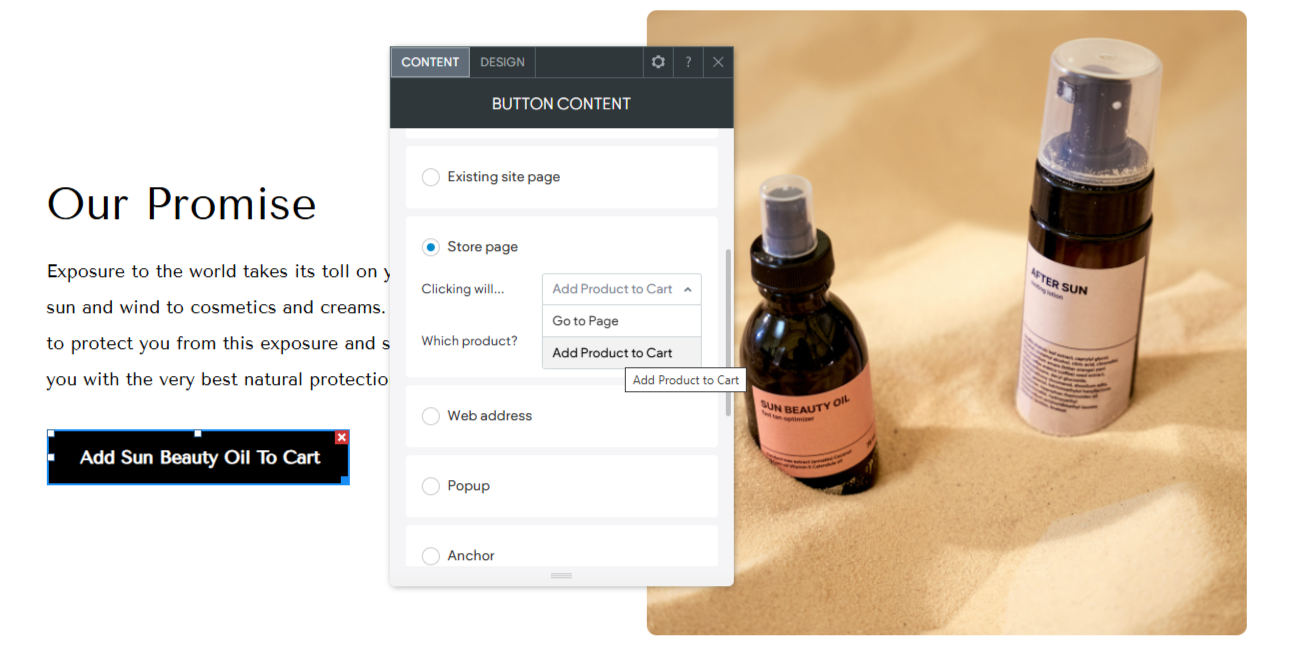
The “Add Product to Cart” option within the Turnkey eCommerce™ platform streamlines the purchasing process by allowing customers to quickly add products to their shopping cart directly from various links. This feature enhances the shopping experience by making it more convenient and efficient.
Key Features of the Add Product to Cart Option #
- Direct Product Addition: Customers can add products to their cart with a single click from various locations within the store.
- Seamless Integration: Easily incorporate this option into different parts of your store without disrupting the overall design.
- Enhanced User Experience: Simplifies the process of adding items to the cart, encouraging more purchases.
How to Use the Add Product to Cart Option #
- Access Store Management:
- In the side panel, click Sell Online and then select Store Management.
- Choose a Link Location:
- Navigate to where you want to add the “Add to Cart” option, such as product descriptions or promotional banners.
- Enable the Option:
- Use the link picker to select the product and activate the “Add Product to Cart” option.
- Save and Implement:
- Save your changes to make the option available to customers.
Benefits of Using the Add Product to Cart Option #
- Increased Convenience: Reduces the steps needed for customers to add products to their cart, enhancing shopping efficiency.
- Higher Conversion Rates: By simplifying the purchase process, this option can lead to more successful transactions.
- Improved Shopping Flow: Customers enjoy a smoother experience, which can increase satisfaction and encourage repeat visits.
Incorporate the “Add Product to Cart” option within your Turnkey eCommerce™ store to provide a more streamlined and effective shopping journey, ensuring customers can easily add items to their cart and complete their purchases.
What's your Reaction?
You have reacted on"Implementing the Add to Cart Button"
A few seconds ago


 Subscriptions
 My Orders
 My Wishlist
 Refer & Earn💸
 My Projects
 Conversations
 Website Services
 New Website Request
 Website Addons
 eCommerce Addons
 eCommerce Modules
 Software Development
 Graphic Design
 Video Production
 Content Writing
 Marketing Services
 Marketing Products
 Get a Marketing Plan
 Local SEO Audit
 Sales Automation
 Service Automation
 Operations Automation
 Marketing Automation
 Payments Automation
 Premium Modules
 Support Tickets
 Latest Updates
 Consultation Calls
 Tools & Extensions
 Tech Tips & Tricks
 Domains & Emails









