Each personalization item added (also called “Insite”) on your site will have its own statistics. In order to access your Personalization analytics, follow these simple steps:
1. Login to your website dashboard (different from client area)
2. Click on the “Stats” link of your site
3. Locate and click on the “inSite” tab on the left menu
On this page you will be able to see the statistics of all of your Conversion Boosters.
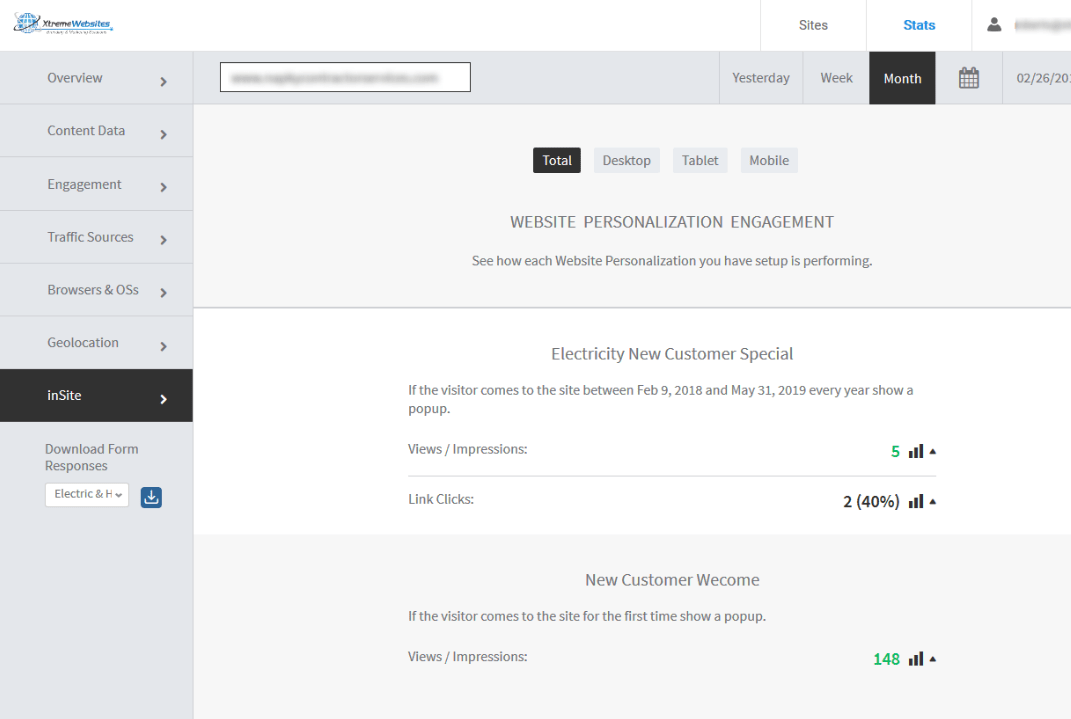
PS: Remember that Insite analytics will also be included with the monthly analytics report you receive via email every month.


 Subscriptions
 My Orders
 My Wishlist
 Refer & Earn💸
 My Projects
 Conversations
 Website Services
 New Website Request
 Website Addons
 eCommerce Addons
 eCommerce Modules
 Software Development
 Graphic Design
 Video Production
 Content Writing
 Marketing Services
 Marketing Products
 Get a Marketing Plan
 Local SEO Audit
 Sales Automation
 Service Automation
 Operations Automation
 Marketing Automation
 Payments Automation
 Premium Modules
 Support Tickets
 Latest Updates
 Consultation Calls
 Tools & Extensions
 Tech Tips & Tricks
 Domains & Emails









