The subscription feature in Turnkey eCommerce™ allows you to offer products on a recurring basis, providing a steady revenue stream and enhancing customer loyalty. Here’s how to manage subscriptions effectively.
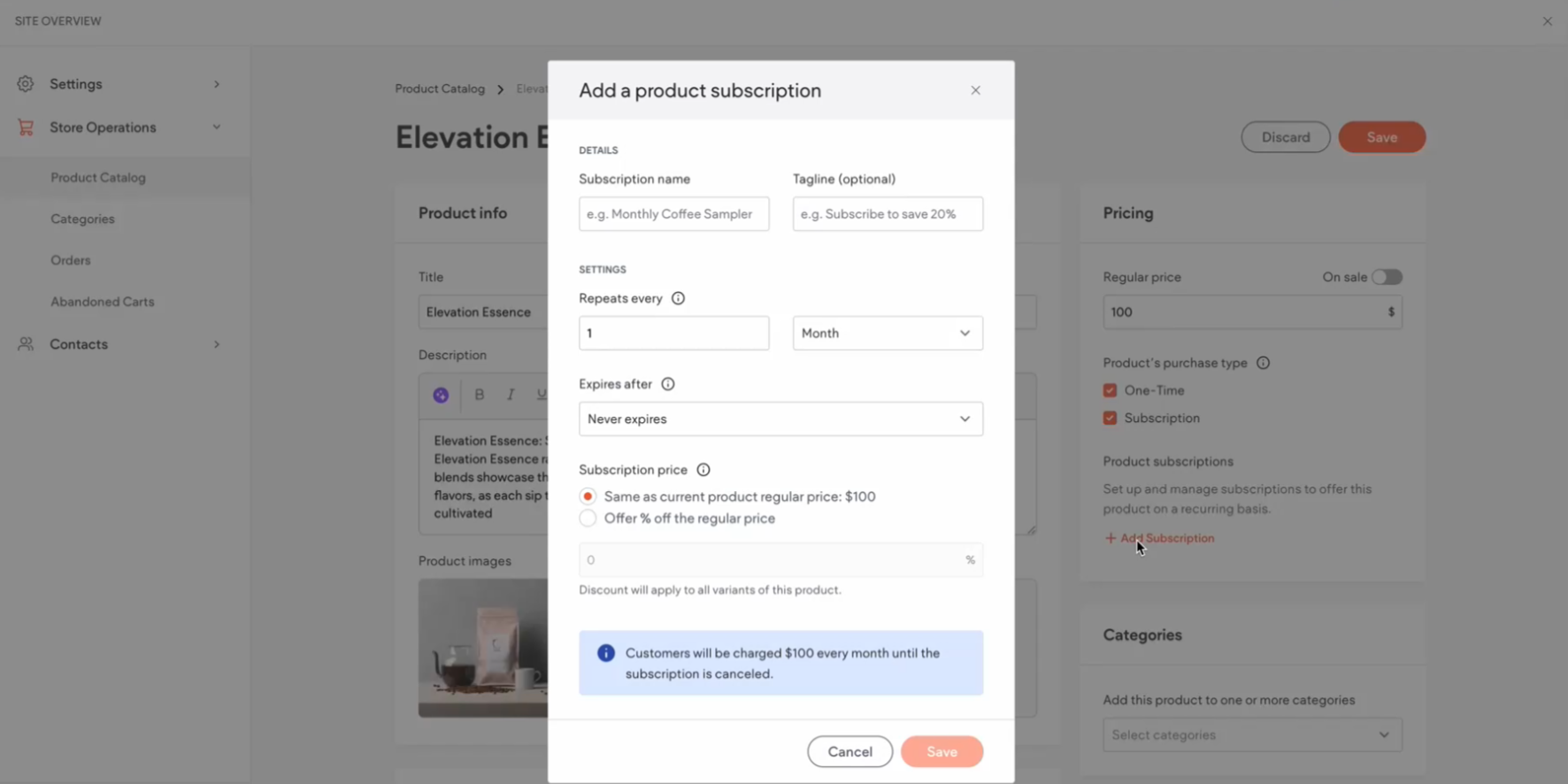
Adding Subscriptions to Products #
- Access Store Management:
- In the side panel, click Sell Online, then select Store Management.
- Navigate to Products:
- Select a Product:
- Choose the product you wish to enable as a subscription.
- Enable Subscription Feature:
- Within the product details, locate the subscription settings.
- Set Subscription Frequency:
- Choose how often the subscription will renew (e.g., weekly, monthly).
- Determine Pricing:
- Set the subscription price according to your business model.
- Configure Subscription Terms:
- Define any terms such as minimum subscription duration or cancellation policies.
- Review Subscription Settings:
- Ensure all settings align with customer expectations.
- Save Changes:
- Click Save to apply the subscription settings to the product.
Viewing Current Subscribers #
- Access Subscriber Details:
- In the side panel, click Sell Online, then select Subscription Management.
- Review Subscriber List:
- View details of current subscribers, including subscription status and payment information.
Managing Subscriptions #
- Navigate to Subscription Management:
- In the side panel, click Sell Online, then select Store Management.
- Select Subscriptions:
- Open the Subscriptions section to manage active subscriptions.
- Edit Subscription Details:
- Update frequencies, pricing, or other subscription terms as needed.
- Confirm and Save Changes:
- Make sure to save any updates to keep the subscriptions current.
Deleting and Canceling Subscriptions #
- Locate the Subscription:
- In the Subscriptions panel, find the subscription to delete or cancel.
- Delete a Subscription:
- Click the three horizontal dots icon next to the subscription and select Delete subscription.
- Confirm the deletion, noting this action is irreversible.
- Cancel an Active Subscription:
- Select the active subscription and choose Cancel subscription.
- Confirm the cancellation to stop future billing and customer access.
Benefits of Offering Subscriptions #
- Predictable Revenue: Subscriptions provide a consistent income stream, helping with financial planning and stability.
- Enhanced Customer Retention: Offering subscriptions encourages repeat business and fosters long-term customer relationships.
Implementing subscriptions within your Turnkey eCommerce™ store can significantly enhance your business model, providing both you and your customers with added value and convenience.
What's your Reaction?
You have reacted on"Managing Store Subscriptions"
A few seconds ago


 Subscriptions
 My Orders
 My Wishlist
 Refer & Earn💸
 My Projects
 Conversations
 Website Services
 New Website Request
 Website Addons
 eCommerce Addons
 eCommerce Modules
 Software Development
 Graphic Design
 Video Production
 Content Writing
 Marketing Services
 Marketing Products
 Get a Marketing Plan
 Local SEO Audit
 Sales Automation
 Service Automation
 Operations Automation
 Marketing Automation
 Payments Automation
 Premium Modules
 Support Tickets
 Latest Updates
 Consultation Calls
 Tools & Extensions
 Tech Tips & Tricks
 Domains & Emails









