Abandoned carts occur when customers add items to their shopping cart but do not complete the purchase. Managing these carts effectively can help recover lost sales and enhance the shopping experience.
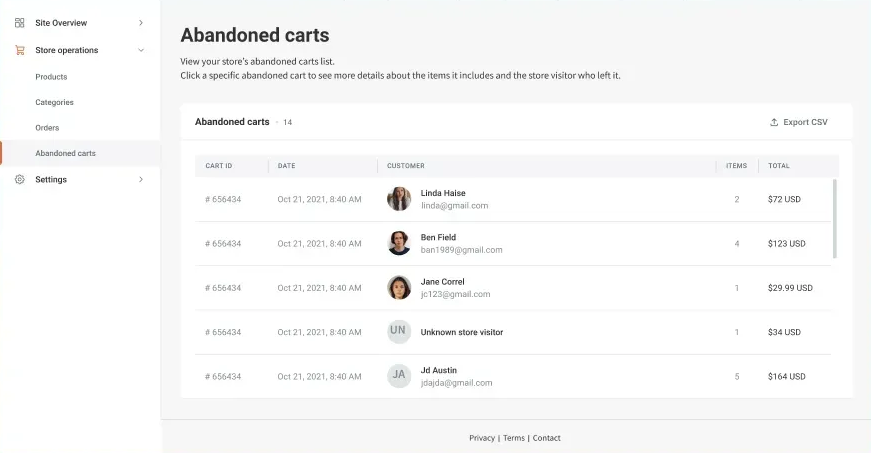
Understanding Abandoned Carts #
- Definition: A cart is considered abandoned when it has not been modified for more than 4 hours.
- Criteria: To qualify as an abandoned cart, it must contain at least one item, and the customer must have entered their email address.
- Expiration: Abandoned carts will expire and be removed from the system after 90 days.
Accessing Abandoned Carts #
To view and manage abandoned carts:
- Navigate to Store Management:
- In the side panel, click Sell Online, then select Store Management.
- View Abandoned Carts:
- Click Orders and select Abandoned Carts.
- Explore Cart Details:
- Each cart entry includes details such as cart ID, date of abandonment, number of items, and total cart value.
By managing abandoned carts effectively within your Turnkey eCommerce™ store, you can enhance sales performance and customer satisfaction.
What's your Reaction?
You have reacted on"Understanding and Utilizing Abandoned Carts"
A few seconds ago


 Subscriptions
 My Orders
 My Wishlist
 Refer & Earn💸
 My Projects
 Conversations
 Website Services
 New Website Request
 Website Addons
 eCommerce Addons
 eCommerce Modules
 Software Development
 Graphic Design
 Video Production
 Content Writing
 Marketing Services
 Marketing Products
 Get a Marketing Plan
 Local SEO Audit
 Sales Automation
 Service Automation
 Operations Automation
 Marketing Automation
 Payments Automation
 Premium Modules
 Support Tickets
 Latest Updates
 Consultation Calls
 Tools & Extensions
 Tech Tips & Tricks
 Domains & Emails









