Streamline your store’s operations by ensuring your business information is up-to-date. This includes vital details such as your business name, address, and regional settings, which appear on customer invoices and are essential for certain store functionalities within the Turnkey eCommerce™ platform.
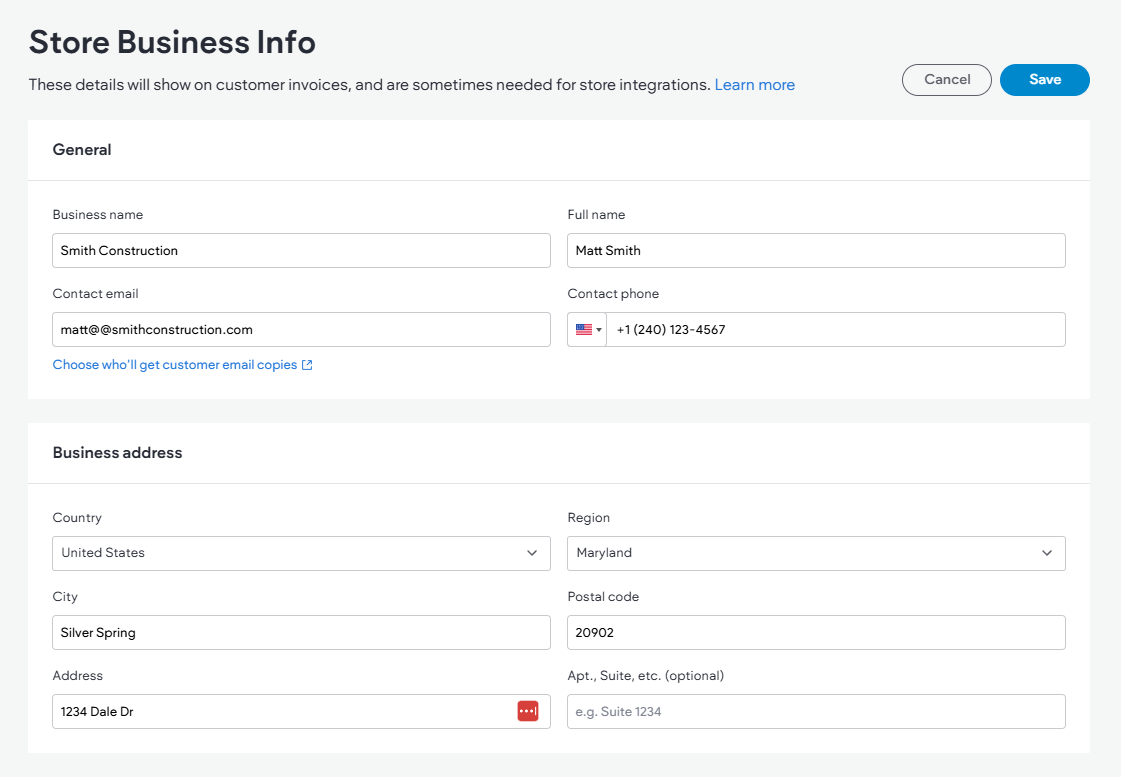
How to Configure Business Information #
- Access Store Management:
- Navigate to the side panel and select Sell Online.
- Click on Store Management.
- Update Business Info:
- Select Taxes and then Store Business Info.
- Fill in the required fields under General, Business Address, and Regional Settings.
- Save your changes to apply them.
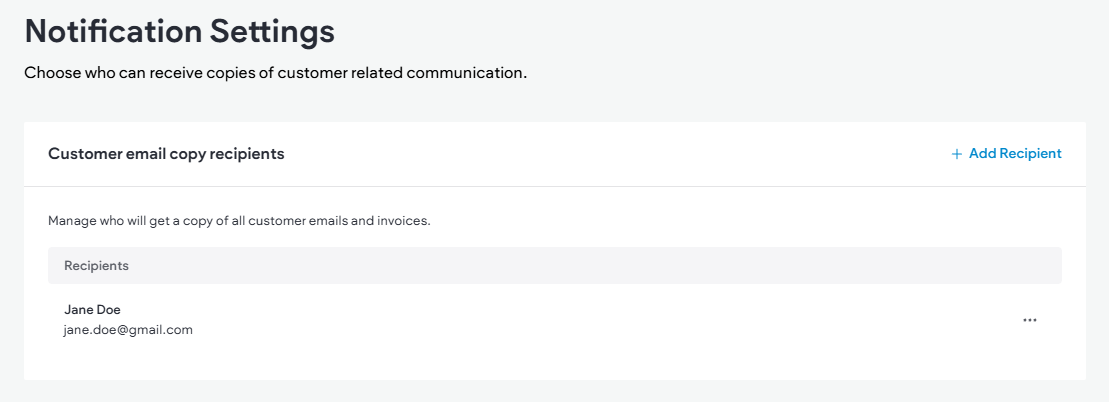
Managing Store Emails #
Ensure efficient communication by managing your store’s email settings. You can specify who receives copies of customer emails and invoices:
- Navigate to Store Emails:
- In the side panel, click Sell Online, followed by Store Management.
- Select Shipping & Pickup, then expand Store Emails and choose Notification Settings.
- Add or Manage Recipients:
- To add a new recipient, click + Add Recipient and fill in the Full name and Email address. Click Add Recipient to save.
- For existing email addresses, click the three-dot icon to Edit Recipient or Remove them.
- Save to ensure all added emails receive customer communication copies.
By keeping your store’s business information and email settings updated, you enhance the operational efficiency of your Turnkey eCommerce™ store, ensuring a seamless experience for both you and your customers.
What's your Reaction?
You have reacted on"Managing Store Business Information"
A few seconds ago


 Subscriptions
 My Orders
 My Wishlist
 Refer & Earn💸
 My Projects
 Conversations
 Website Services
 New Website Request
 Website Addons
 eCommerce Addons
 eCommerce Modules
 Software Development
 Graphic Design
 Video Production
 Content Writing
 Marketing Services
 Marketing Products
 Get a Marketing Plan
 Local SEO Audit
 Sales Automation
 Service Automation
 Operations Automation
 Marketing Automation
 Payments Automation
 Premium Modules
 Support Tickets
 Latest Updates
 Consultation Calls
 Tools & Extensions
 Tech Tips & Tricks
 Domains & Emails









