Content AI is a writing assistant driven by artificial intelligence, which aids in generating content more efficiently, effortlessly, and with superior quality. It can assist in creating content that aligns with specific tones and keywords, while also producing multiple variations.

To create a new Social Media post using Content AI, click on the blue New Post button and select Content AI. You will see a pop-up appear where you can input your AI generation prompts.
- Post Title Enter the name of the topic or category of content, such as “Content Marketing.”
- Provide a Brief Description. Type in a brief post description here. For example, “short-form videos are changing the marketing trend in social media marketing strategies.”
- Add Keywords Enter the keyword (enter the word and hit enter) such as “short-form videos, marketing, strategy, content generation.”
- Writing Tone Choose the writing tone from options like Funny, Excited, Casual, etc.
- Number of Variations Choose the Number of variations you’d like created from 1 to 5
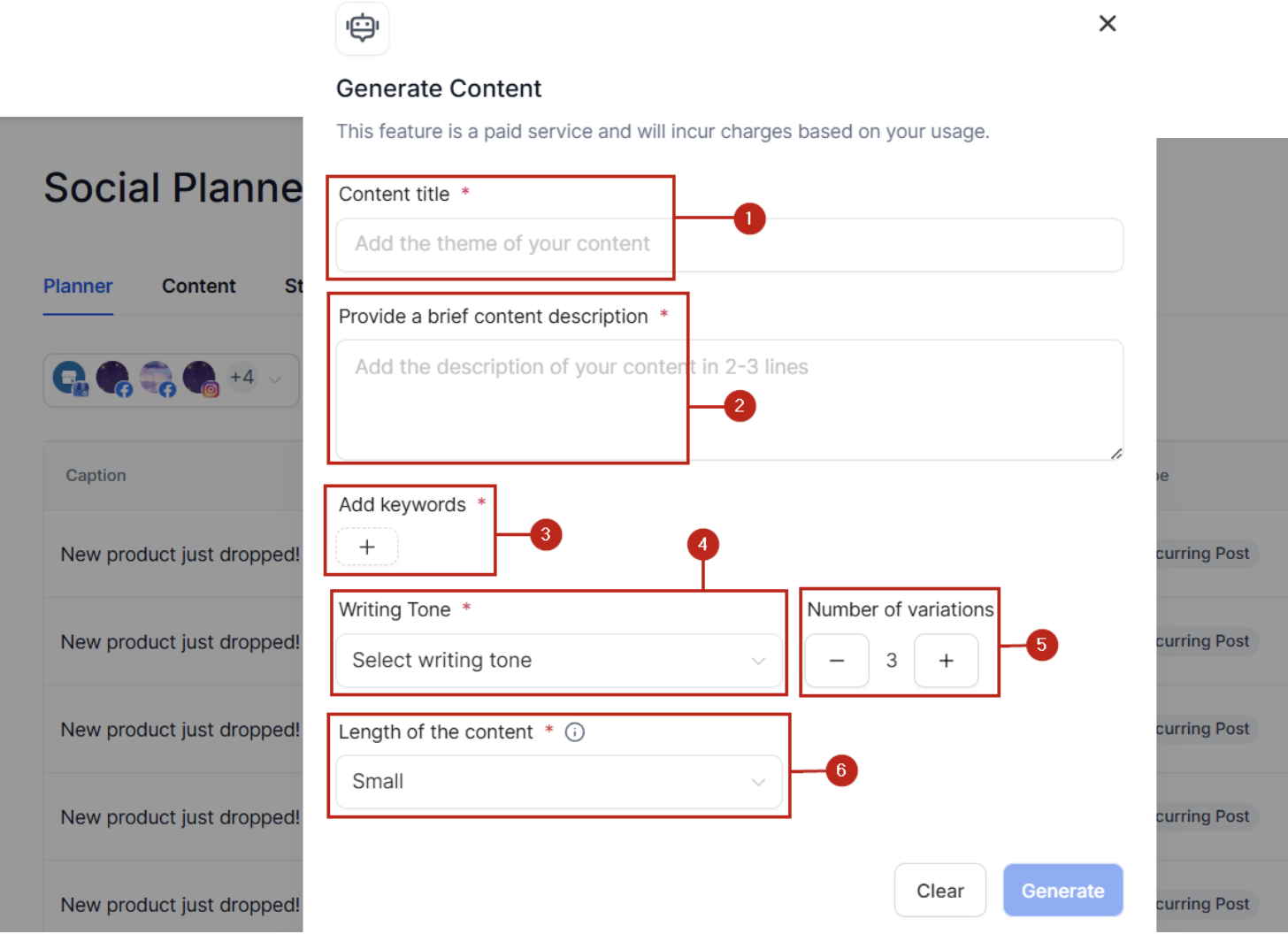
Generate Content #
Once done click the Generate button. This will provide the content variations generated from the title, description, keywords, and writing tone you provided

To edit the prompt click the “Generate new content” button, it will return you to the content generation page.

Click the “Copy” button under the content variation you like. Once clicked, you will see the selection appear in the Text box on the right corner of the page for preview and editing.

Create Content AI Post #
Click the Continue button to direct you to the Post Builder. Here you can choose the social media channel on which you want to post the content, edit your post, and either post immediately or schedule for later.

What's your Reaction?
You have reacted on"Content AI"
A few seconds ago


 Subscriptions
 My Orders
 My Wishlist
 Refer & Earn💸
 My Projects
 Conversations
 Website Services
 New Website Request
 Website Addons
 eCommerce Addons
 eCommerce Modules
 Software Development
 Graphic Design
 Video Production
 Content Writing
 Marketing Services
 Marketing Products
 Get a Marketing Plan
 Local SEO Audit
 Sales Automation
 Service Automation
 Operations Automation
 Marketing Automation
 Payments Automation
 Premium Modules
 Support Tickets
 Latest Updates
 Consultation Calls
 Tools & Extensions
 Tech Tips & Tricks
 Domains & Emails










