Posting on TikTok through the Social Planner in your CRM is a streamlined process that allows you to create, customize, and schedule engaging video content directly from your dashboard. Follow these steps to get your videos ready for TikTok in no time.
To get started, navigate to Marketing > Social Planner > + New Post > Create New Post.
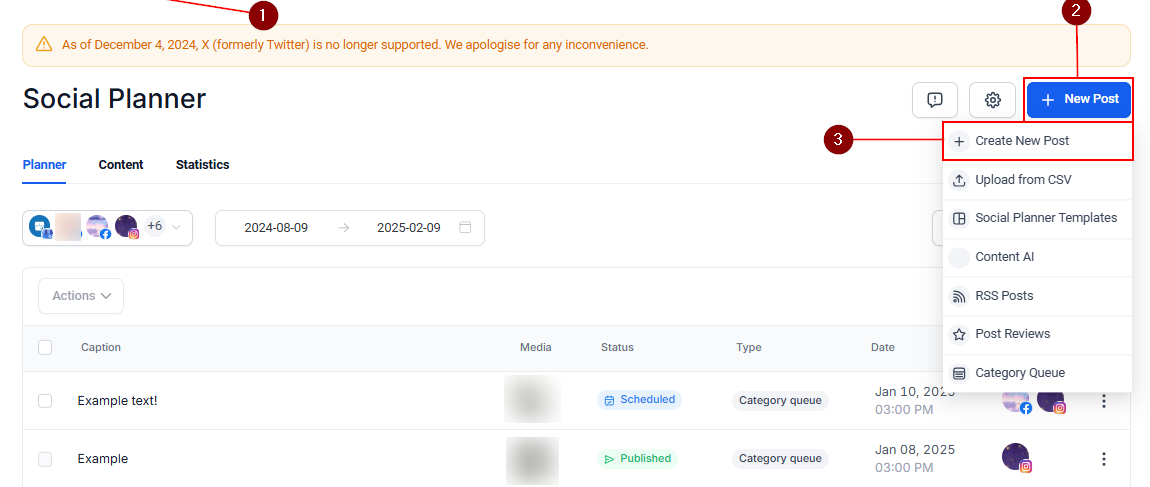
In the Select a Social Account dropdown, choose your TikTok account.

Click the video icon to add videos. You can choose from your CRM’s media storage or upload a video directly from your device.

In the pop-up window, either upload new videos or select existing ones from your Media Storage.

Once the upload is successful, the video will appear. There are options to add a caption to your video and preview how your post will look in the Post Preview pane on the right-hand side.

Configure Advanced Options #
Expand the advanced options dropdown to include;
- Watermarks (Note: These apply only to images, not videos or GIFs). You can toggle this option off.
- Choose Category: Assign or create a category for your post.
- Tags: Add relevant tags to improve discoverability.

TikTok Options #
In the TikTok Options section, you can configure additional settings:
- Who Can View Your Video: Decide if the post is public, private, or visible to friends only.
- What Users Can Do with Your Video: Choose whether viewers can duet, stitch, or comment on your video.
- Disclose Video Content: Indicate if the video contains branded content or represents your brand.

Save or Publish Your Post #
When you’re done customizing your TikTok post save it as a draft to revisit later or use the dropdown under Post to choose the appropriate scheduling or publishing option.

Posting to TikTok through your CRM’s Social Planner is an efficient way to share content without switching through endless social apps. By using its advanced options and TikTok-specific settings, you can ensure each post is tailored to your audience and brand goals.
FAQs #
Q: Why is my video not supported?
- TikTok supports video dimensions ranging from 360 px to 4096 px in height and width. If your video’s height is 224 px and its width is 384 px, it falls outside the supported range. Ensure your video meets TikTok’s size requirements before uploading.
Q: Why can’t I add watermarks to my video?
- Watermark support is available exclusively for images. Unfortunately, watermarks cannot be applied to GIFs or videos. Consider editing your video to include a watermark before uploading if needed.
What's your Reaction?
You have reacted on"How to Post to TikTok"
A few seconds ago


 Subscriptions
 My Orders
 My Wishlist
 Refer & Earn💸
 My Projects
 Conversations
 Website Services
 New Website Request
 Website Addons
 eCommerce Addons
 eCommerce Modules
 Software Development
 Graphic Design
 Video Production
 Content Writing
 Marketing Services
 Marketing Products
 Get a Marketing Plan
 Local SEO Audit
 Sales Automation
 Service Automation
 Operations Automation
 Marketing Automation
 Payments Automation
 Premium Modules
 Support Tickets
 Latest Updates
 Consultation Calls
 Tools & Extensions
 Tech Tips & Tricks
 Domains & Emails










