Customizing review widgets in reputation management is a valuable strategy to leverage customer feedback for improving your brand’s online image and boosting trust among your audience. This article introduces the new Review Widget Customization feature, which allows businesses to tailor their review widgets to match their brand’s style and cater to their audience’s preferences. This guide will walk you through the process of creating and customizing your review widgets step by step.
Accessing the Review Widget Customization Tool #
To begin personalizing your review widgets, go to the “Reputation” section and click on the “Widgets” tab.
Click the “Create Widget” button to start crafting your custom review widget. Alternatively, you can select from existing templates in the “Templates” tab.

Layout Tab: Setting Up Widget Structure #
In the “Layout” tab, you can determine the basic structure of your widget:
- Decide where your reviews will come from, such as Google My Business (GMB) or Facebook (FB).
- Choose your preferred widget type: List, Masonry, Grid, Carousel, or Legacy.
- Specify the maximum amount of reviews you want to display.
- Choose to filter the reviews based on the rating. Please check your local laws and regulations before applying a filter. Do not use this feature if you reside in a jurisdiction where review filtering is prohibited (such as the United States).
- Decide whether you want to show or hide the “Powered by” section at the end of the review widget.

Content Tab: Customizing Widget Header and Description #
In the “Content” tab, you can fine-tune how your widget looks:
- Improve the widget’s heading and description to make it engaging and consistent with your brand.
- Customize the header section to include or exclude the rating, total review count, and “Write a review” button within the widget.

Appearance Tab: Choosing Themes, Fonts and Colors #
The “Appearance” tab lets you control the visual style of your widget:
- Pick from ready-made themes like Light or Dark, or create a Custom theme. If you go for a Custom theme, you can change individual component colors, such as the widget heading, review text, star ratings, background, and borders.
- Select the most suitable font and colors for your branding.

Settings Tab: Refining Widget Behavior #
In the “Settings” tab, you can further adjust how your widget behaves:
- Decide whether to display review elements like the review date and reviewer’s icon.
- Choose to exclude reviews that don’t have descriptions.
- Copy the embed code for your website to easily display your widget where you want it.

Saving, Naming, and Managing Your Widgets #
Give your widget a meaningful name for easy identification. You can see all your saved widgets in the “Saved Widgets” tab.
You can choose to save your widget for future use or make it live immediately on your website.

Deleting a Widget #
If you no longer need a widget, you can delete it by clicking on the menu icon at the upper corner of the widget.
Please note that live widgets cannot be deleted. Another widget would have to be created and assigned as the live widget to be able to delete the original widget.

With the Review Widget Customization feature, you have the flexibility to create visually appealing review widgets that align with your brand. Customize the layout, content, appearance, and settings to engage your audience and enhance your online reputation. Start creating your custom review widgets today to make a powerful impact in the digital world.
Live Reviews Widget #
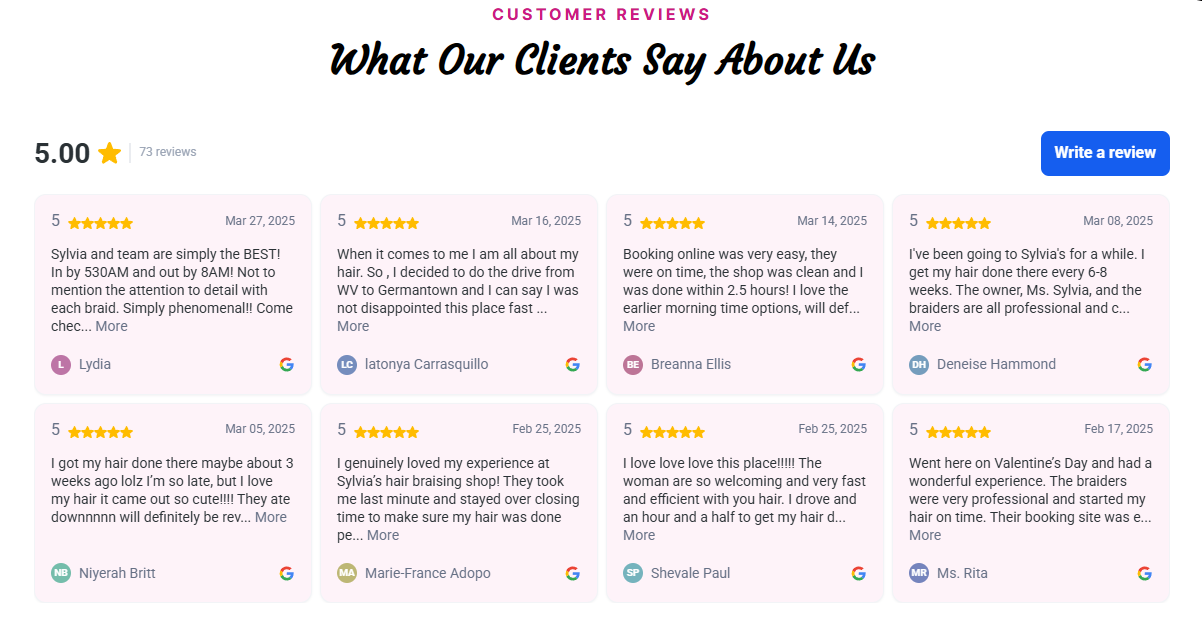
Once you paste the embed code into your website, your page will display your latest reviews dynamically according to your configuration.
What's your Reaction?
You have reacted on"Review Widget Customization"
A few seconds ago


 Subscriptions
 My Orders
 My Wishlist
 Refer & Earn💸
 My Projects
 Conversations
 Website Services
 New Website Request
 Website Addons
 eCommerce Addons
 eCommerce Modules
 Software Development
 Graphic Design
 Video Production
 Content Writing
 Marketing Services
 Marketing Products
 Get a Marketing Plan
 Local SEO Audit
 Sales Automation
 Service Automation
 Operations Automation
 Marketing Automation
 Payments Automation
 Premium Modules
 Support Tickets
 Latest Updates
 Consultation Calls
 Tools & Extensions
 Tech Tips & Tricks
 Domains & Emails









