Instagram Stories are short content meant to quickly update and captivate viewers to redirect them to your profile. Posting them enhances brand visibility and promotes follower engagement. However, since they only last 24 hours stories are a numbers game. With the social media planner, you can organize and schedule yours, helping you keep relevant with your followers.
Getting Started #
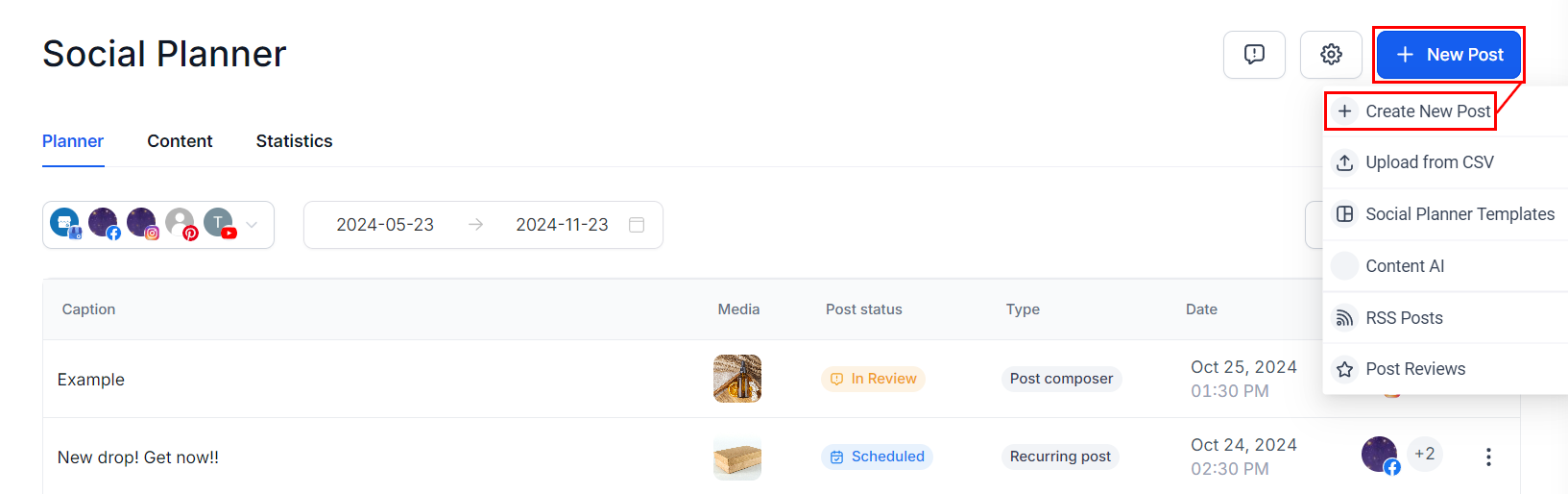
Start by clicking “New Post” in the top right corner. Select “Create New Post.” Alternatively. Additionally, there’s a “Create New Post” link at the bottom of your posts list.
Select Instagram as the social media platform on which you want to post.

Select your desired image or video for the Story. The maximum image file size is 8 MB, and the maximum video length is 60 seconds. Adding text or captions is not supported for Stories.

Scroll down to Instagram options, open the drop-down menu then select Story as the post type.

You can preview all your content here before you post it.

Once you are happy with your stories click on the Post button, it will give you the options for the next step with the post. These will be:

After selecting the next step you’re done! Your Instagram Story is ready to go. That’s all there is to it. Now you can get your posting schedule organized and consistent helping you to grow your audience and reach new heights.
What's your Reaction?
You have reacted on"Posting Instagram Stories"
A few seconds ago


 Subscriptions
 My Orders
 My Wishlist
 Refer & Earn💸
 My Projects
 Conversations
 Website Services
 New Website Request
 Website Addons
 eCommerce Addons
 eCommerce Modules
 Software Development
 Graphic Design
 Video Production
 Content Writing
 Marketing Services
 Marketing Products
 Get a Marketing Plan
 Local SEO Audit
 Sales Automation
 Service Automation
 Operations Automation
 Marketing Automation
 Payments Automation
 Premium Modules
 Support Tickets
 Latest Updates
 Consultation Calls
 Tools & Extensions
 Tech Tips & Tricks
 Domains & Emails










