Managing affiliate commissions effectively is crucial for maintaining motivation and ensuring the success of your affiliate program. With Affiliate Level Commission Settings, you can set custom commission rates for individual affiliates within a campaign, offering a flexible and precise approach to commission management. This feature allows you to override campaign-level commission settings with affiliate-specific settings, making rewarding top performers and managing your affiliates easier.
This article will guide you through the steps to navigate and utilize the Affiliate Level Commission Settings, ensuring you can optimize your affiliate program to its fullest potential.
Navigate to the Affiliate Manager #
To begin, log into your account and access the Affiliate Manager. This is where you will manage all aspects of your affiliate program, including setting individual commission rates.
Select the Affiliate #
Next, go to the Affiliate Page. Here, you will find a list of all your affiliates. Select the affiliate for whom you want to set custom commission rates. This ensures you are making adjustments for the correct individual.

Choose the Campaign #
Scroll down to the “Active Referral Link” section. Locate the campaign you want to customize and click on “Customize” next to it. This will allow you to configure the commission settings specific to that campaign for the chosen affiliate.

Configure Affiliate Level Commissions #
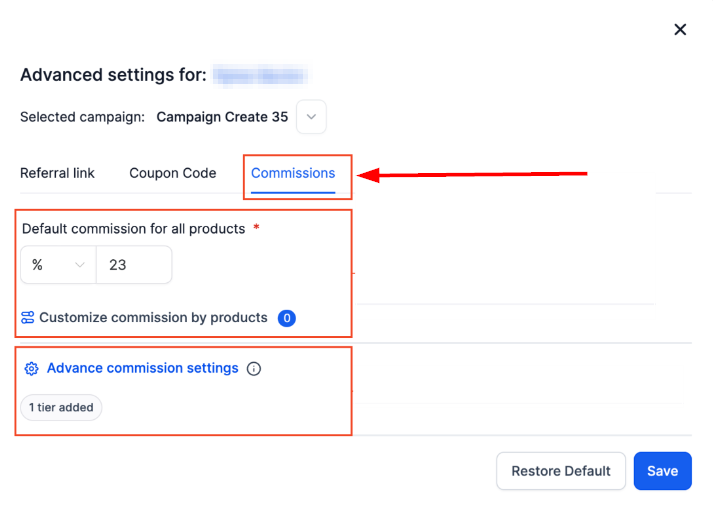
In the campaign settings, switch to the “Commissions” tab. Enter the custom commission rate for the selected affiliate. You can configure both the Default Commissions and Product-Based Commissions as needed. If the campaign is multi-tiered, you can also set commission rates for each tier. Remember to save your changes to apply the new settings.
By leveraging the Affiliate Level Commission Settings, you can effectively manage your affiliate program, ensuring top performers are adequately rewarded and motivated. This flexibility not only enhances affiliate satisfaction but also drives the overall success of your campaigns. Implement these steps to fine-tune your commission structures and maximize the potential of your affiliate marketing efforts.
Important Notes #
- Precedence: Affiliate-level commission settings will always take precedence over campaign-level settings for commission calculation. This ensures that your custom settings for individual affiliates are applied correctly.
- Tier Management: Users cannot change tiers in the affiliate profile settings. The tier dropdown will be disabled. Changes to tiers must be made in the campaign settings.
- Support: Currently, only affiliate campaigns where the source is a funnel or website support this feature.
What's your Reaction?
You have reacted on"Affiliate Level Commission Settings"
A few seconds ago


 Subscriptions
 My Orders
 My Wishlist
 Refer & Earn💸
 My Projects
 Conversations
 Website Services
 New Website Request
 Website Addons
 eCommerce Addons
 eCommerce Modules
 Software Development
 Graphic Design
 Video Production
 Content Writing
 Marketing Services
 Marketing Products
 Get a Marketing Plan
 Local SEO Audit
 Sales Automation
 Service Automation
 Operations Automation
 Marketing Automation
 Payments Automation
 Premium Modules
 Support Tickets
 Latest Updates
 Consultation Calls
 Tools & Extensions
 Tech Tips & Tricks
 Domains & Emails









