

 Subscriptions
 My Orders
 My Wishlist
 Refer & Earn💸
 My Projects
 Conversations
 Website Services
 New Website Request
 Website Addons
 eCommerce Addons
 eCommerce Modules
 Software Development
 Graphic Design
 Video Production
 Content Writing
 Marketing Services
 Marketing Products
 Get a Marketing Plan
 Local SEO Audit
 Sales Automation
 Service Automation
 Operations Automation
 Marketing Automation
 Payments Automation
 Premium Modules
 Support Tickets
 Latest Updates
 Consultation Calls
 Tools & Extensions
 Tech Tips & Tricks
 Domains & Emails
10
Jun
Smarter eCommerce Product Management at Scale📦
Manage Turnkey eCommerce™products at scale with less friction, more features and more speed.
June 10, 2026





June 10, 2026

June 10, 2026

June 3, 2026

May 26, 2026

May 20, 2026

Communities are a hotspot for interaction, they allow you and your audience to interact and create a space for everyone to express, learn, and grow together. However, to keep that space safe and productive you need to establish rules and people to ensure everything runs smoothly.
Think of a community group as a team. In this team, there are four important roles:
The permission level goes from Owner to Contributor.
| Role | Create Posts | Moderate Posts | Manage Members | Delete Group |
|---|---|---|---|---|
| Owner | ✅ | ✅ | ✅ | ✅ |
| Admin | ✅ | ✅ | ✅ | ❎ |
| Moderator | ✅ | ✅ | ❎ | ❎ |
| Contributor | ✅ | ❎ | ❎ | ❎ |
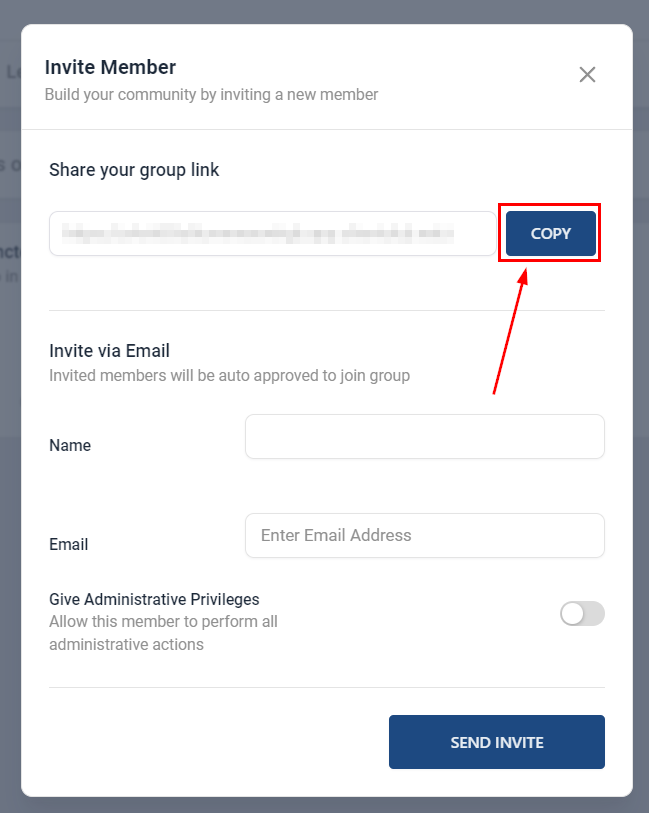
To get people to join your group, you can invite them by adding their information inside the “Invite via Email” section in your communities platform, or by copying the special link and sending it to them in an SMS/Email.
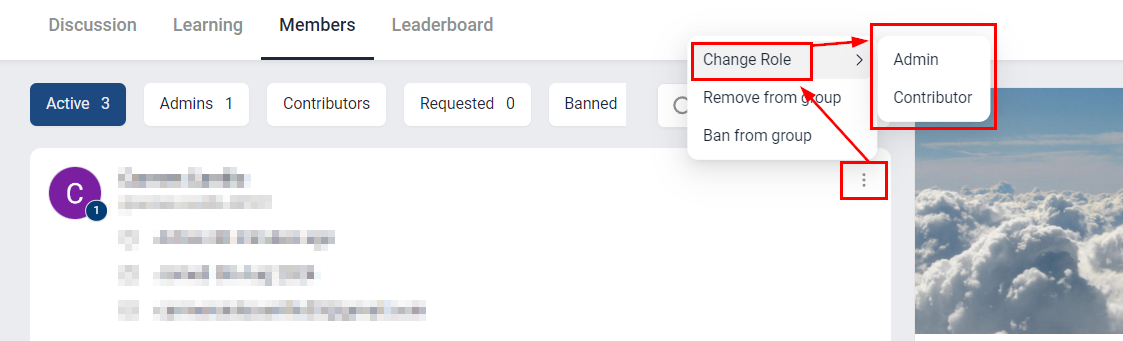
Owners and Admins can decide who can do what in the group. If you want to change someone’s job, follow these steps:
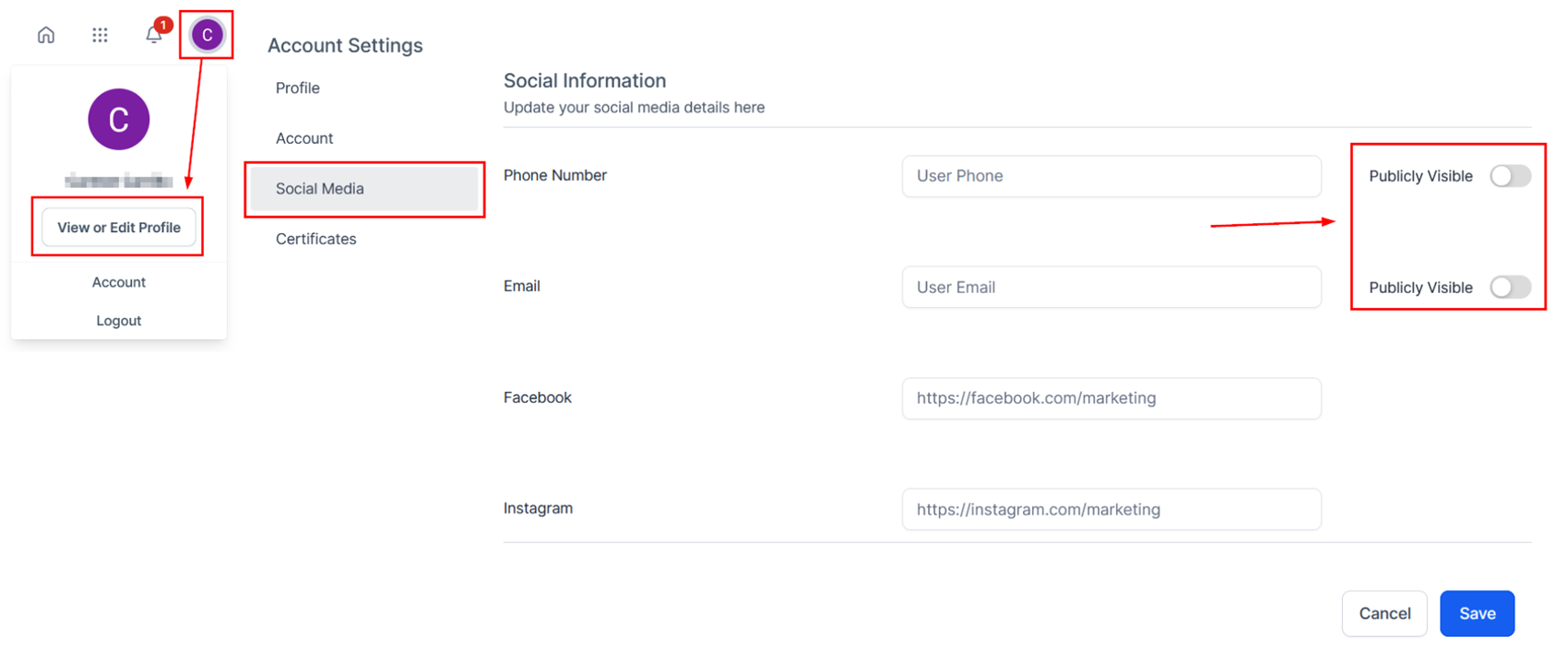
Members can click on their profile picture on the top right to access their View or Edit Profile area. From here, they can access the Social Media tab to choose whether or not they wish their Email/Phone to be visible.
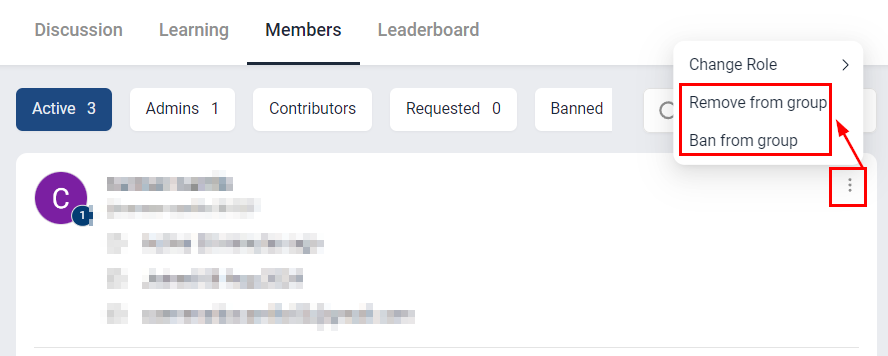
As your group is growing you may encounter undesired guests, if this happens Owners and Admins can kick someone out of the group if needed. Removing someone revokes their member status but they can join the group again in the future, Banning someone is a permanent solution since they will not be able to join the group again. To do so:
Sometimes, a group might move to a new place, like changing schools. Here’s how to make that move:
A: Yes, you can add the action “Grant Group Access” to any workflow to give your clients access to any group.
A: You can invite multiple members at once by sending out a bulk email or SMS with the group URL included.
A: Members can share the group URL with others, effectively inviting them. However, to maintain control over group membership, Admins and Owners can remove anyone they do not wish to allow in a group or with Private groups refuse the request to join altogether.
A: Absolutely. It’s possible the invitation was missed, or they haven’t had a chance to join yet. Simply resend the group URL to give them another opportunity to join.
A: When inviting someone to join directly from the Communities platform the message can’t be modified. However, if you invite someone to join via SMS or email you can personalize the invitation, just make sure to keep the group URL in the message.
A: When an invited member clicks on the group URL, they are directed to the group where they can request to join. For Public Groups, they are admitted automatically upon signing up. For Private Groups, admins may accept their request to join in the “Members” section.