Keeping your CRM organized is key to maintaining efficiency and productivity. With the ability to move forms and surveys between folders, you can easily adapt to changing needs and keep your workspace clutter-free. Here’s how to make the most of this feature. To take full advantage of this feature, follow these simple steps:
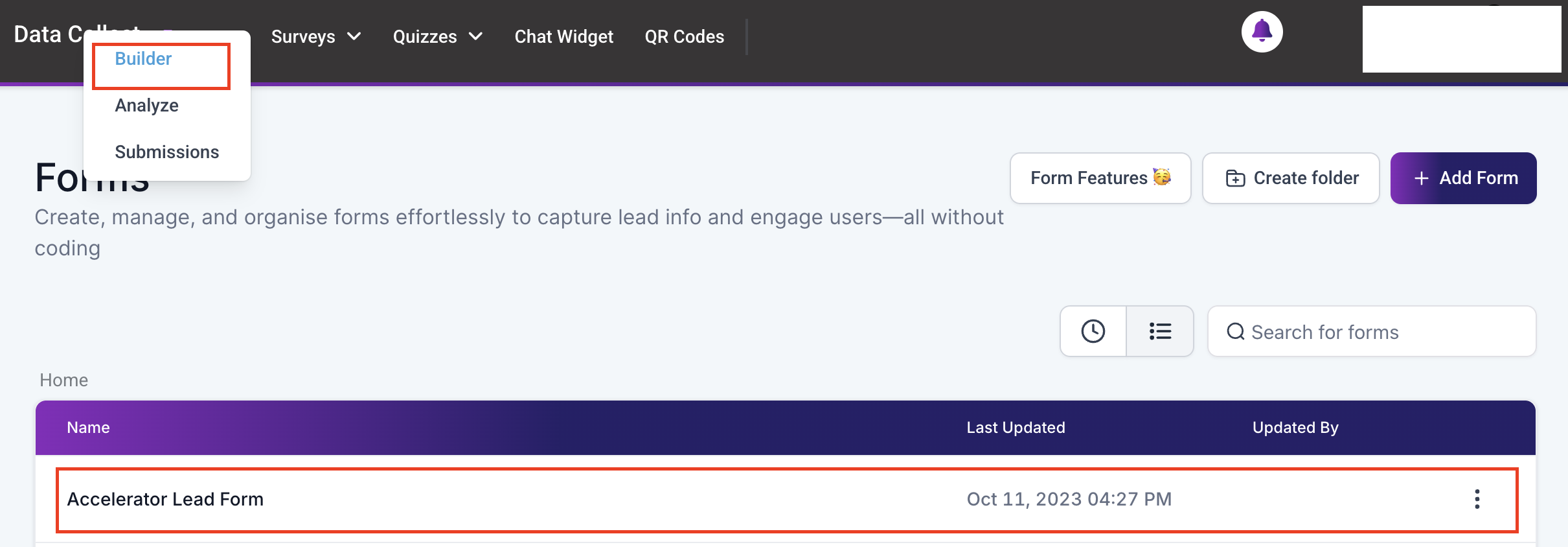
Select the Form or Survey #
Within the CRM interface, navigate to the Data Collect section, in the Forms dropdown click on Builder then locate and click on the form or survey you wish to move.
Access the Options Menu #
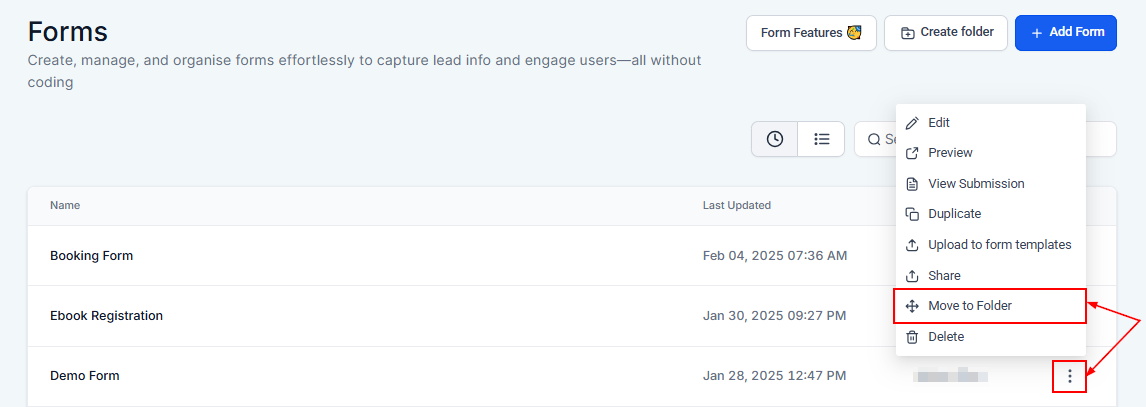
Click on the three vertical dots to open the options menu and look for the “Move to Folder” option.
Confirm the Move #
Click on “Move to Folder,” then select the destination folder if necessary. Confirm your action by selecting the “Move To Selected Folder” option to complete the move.

Practical Examples and Use Cases #
- Reorganizing Projects: As priorities shift, move forms and surveys into folders that reflect current projects or goals, making them easier to locate and use.
- Archiving Old Data: Keep your workspace tidy by moving outdated or completed forms and surveys into an archive folder for future reference.
- Categorizing by Purpose: Group forms and surveys by type, such as feedback forms, event registrations, or lead capture forms, to streamline access and improve efficiency.
- Collaborative Workflows: Organize forms and surveys by team or department to ensure everyone can quickly find what they need.
Keeping your forms and surveys organized doesn’t have to be a hassle. With just a few simple steps, you can maintain a tidy, efficient CRM environment, helping you stay focused on what matters most—growing your business.
Troubleshooting Tips and FAQs #
Q: What if I accidentally move a form or survey to the wrong folder?
- A: Simply repeat the steps above to move it to the correct folder.
Q: Can I move multiple forms or surveys at once?
- A: Currently, forms and surveys need to be moved individually to ensure precise organization.
Q: How will moving forms and surveys affect linked campaigns or automation?
- A: Moving a form or survey does not affect its functionality or any linked campaigns or automation. The system maintains all connections, ensuring seamless operation.
What's your Reaction?
You have reacted on"Organize Your Forms & Surveys With Folders"
A few seconds ago


 Subscriptions
 My Orders
 My Wishlist
 Refer & Earn💸
 My Projects
 Conversations
 Website Services
 New Website Request
 Website Addons
 eCommerce Addons
 eCommerce Modules
 Software Development
 Graphic Design
 Video Production
 Content Writing
 Marketing Services
 Marketing Products
 Get a Marketing Plan
 Local SEO Audit
 Sales Automation
 Service Automation
 Operations Automation
 Marketing Automation
 Payments Automation
 Premium Modules
 Support Tickets
 Latest Updates
 Consultation Calls
 Tools & Extensions
 Tech Tips & Tricks
 Domains & Emails











