Before proceeding with the steps, it is important to understand the significance of Facebook domain verification. This process serves as a security measure to ensure that only authorized users can modify how their content is displayed on Facebook. Additionally, domain verification enables you to manage editing permissions for your links and content, safeguarding against potential misuse. Now that you know the basics, let’s dive into the steps.
Adding a Meta Tag #
Copy the Meta Tag from Facebook #
To verify your domain with Facebook, navigate to your Facebook Business Settings. Under the Brand Safety section, select Domains and click Add. Enter your domain and follow the prompts to verify ownership. Choose the option to Add a Meta Tag to Your Homepage, then copy the entire meta tag provided by Facebook to complete the process.
Prepare Your Domain for the Meta Tag #
Navigate to the Domains section of your account and ensure the first step of your funnel/website is set as the default page for your domain.

This is crucial as the meta tag needs to be added to the page that is first loaded when someone visits your domain.
Adding the Meta Tag to Your Funnel #
Access the website or funnel associated with your domain, then edit the default page.

Once the editor loads, navigate to the “SEO Metadata” Icon on the top left of the funnel builder.

Inside the “Links and Tags” dropdown, select the option to add a Custom Meta Tag.

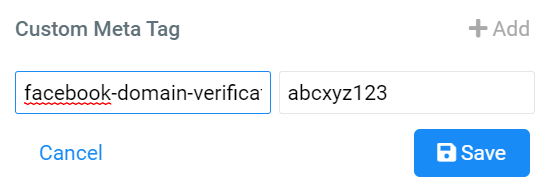
This will open a modal where you can paste the name and content of the meta tag into the respective fields. Ensure accuracy in copying the details from Facebook.

- Copy the name from the meta tag provided by Facebook, and paste it in the “Name” field for the tag. In this example, the name in the tag is: facebook-domain-verification
- Copy the content from the meta tag and paste it in the ‘Content’ field for the tag. In this example, the content in the tag is: abcxyz123
Step 5: Save the SEO Metadata settings
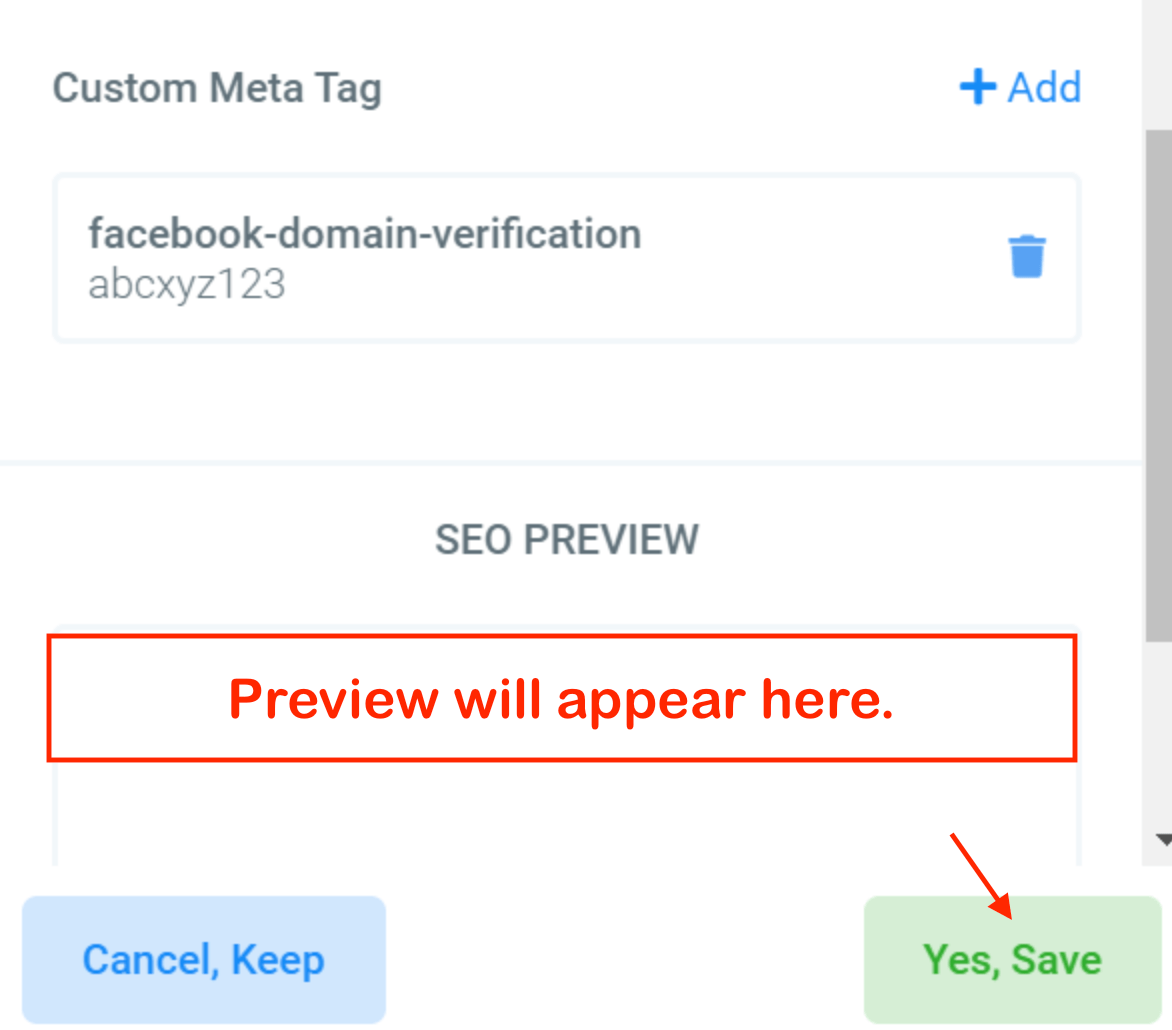
- Save the meta tag
- Save the SEO Metadata settings by clicking on the “Yes, Save” button:
- Save the page from the top nav menu.

Verifying the Meta Tag #
After saving your changes and exiting the editor, open a new tab and navigate to your domain. Use the browser’s developer tools (F12) and the search function (Ctrl + F) to locate the meta tag in the page’s source code. Verify that the name and content of the meta tag match the details provided by Facebook.
By following these steps, you’re helping keep your brand safe on Facebook and making sure your content is displayed correctly.
Verify the Domain in your Facebook Account #
- Log in to your Facebook Business Manager.
Note: You must have admin or developer access to your domain within your Facebook Business Manager to complete the verification.
- Click “Add” to add a new domain.
- Enter in the root domain without any prefixes. For example, enter website.com, not www.website.com
- Click “Add”.
- Choose one of these 3 options to verify your domain:
- Add meta-tag to HTML source code
- Update the DNS TXT record with your domain registrar
- Upload HTML file to your root directory
- Click Verify Domain on your Business Manager to screen.
Click here to learn more from Facebook about how to Verify Your Domains in Business Manager.
Troubleshooting Tips #
- If the meta tag does not appear in the source code, ensure that you have saved all changes and that you are checking the correct URL.
- Double-check that the funnel step you edited is indeed the default page for your domain.
- Verify that there are no typos or missing characters in the meta tag details.
Frequently Asked Questions #
Can I add the meta tag to any page within my CRM?
- The meta tag should be added to the first page that loads when visiting your domain, as this is where Facebook looks for it during verification.
What if I have multiple domains?
- You will need to repeat the process for each domain you wish to verify with Facebook.
How long does Facebook domain verification take?
- Verification is typically instant, but it may take a few minutes for changes to propagate.
What's your Reaction?
You have reacted on"How to Add a Facebook Meta Tag for Domain Verif..."
A few seconds ago


 Subscriptions
 My Orders
 My Wishlist
 Refer & Earn💸
 My Projects
 Conversations
 Website Services
 New Website Request
 Website Addons
 eCommerce Addons
 eCommerce Modules
 Software Development
 Graphic Design
 Video Production
 Content Writing
 Marketing Services
 Marketing Products
 Get a Marketing Plan
 Local SEO Audit
 Sales Automation
 Service Automation
 Operations Automation
 Marketing Automation
 Payments Automation
 Premium Modules
 Support Tickets
 Latest Updates
 Consultation Calls
 Tools & Extensions
 Tech Tips & Tricks
 Domains & Emails









