Automatic Time Zone Capture simplifies the process of scheduling and messaging by automatically detecting and organizing the time zones of leads upon their submission of forms or surveys. This functionality eradicates the need for manual time zone entry, thereby boosting workflow efficiency and ensuring that messages reach clients at the most opportune moments.
Accessing the Form or Survey Builder #
Navigate to the Data Collect tab from the left sidebar menu. Choose to create a new form or survey from scratch, use a template, or edit an existing one.
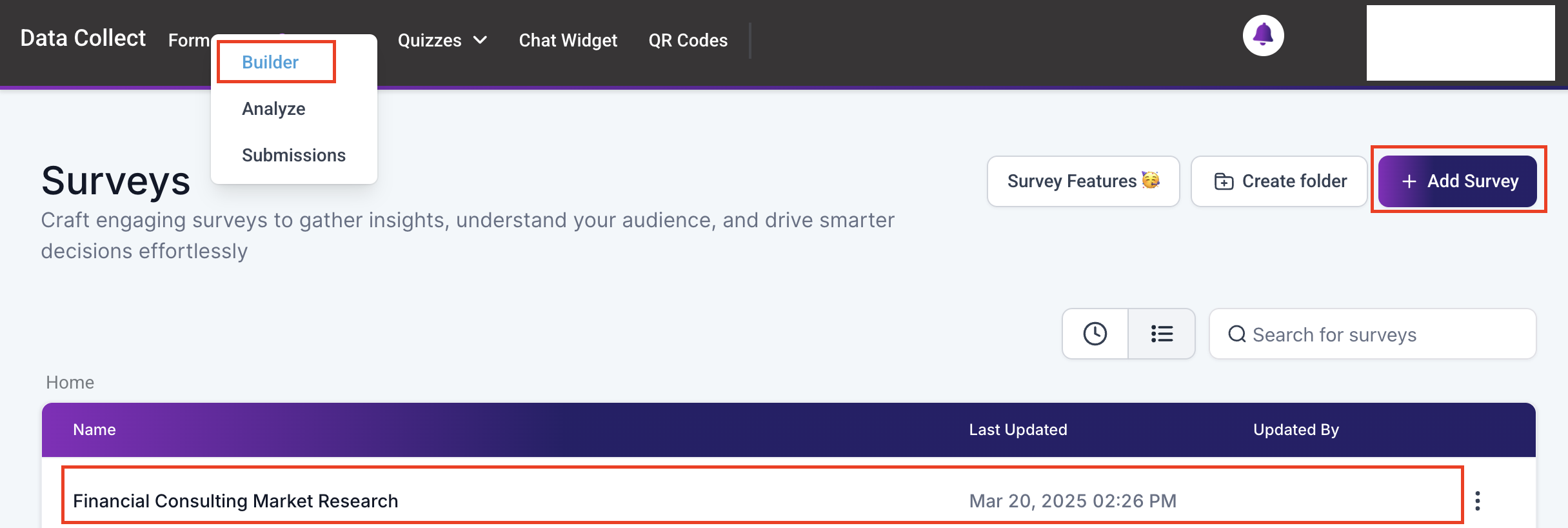
Creating or Editing a Form/Survey #
Within the builder, add the necessary fields to your form or survey.

Enabling the Time Zone Feature #
In the Styles & Options menu, select “Options” and scroll down to locate the time zone feature toggle under Survey Settings. Toggle on the Enable Timezone option.

Click on the “Save” button to apply the settings. Then select on the “Back” button to return to the main menu.

Viewing Submissions #
To check the details of submitted forms or surveys, click on the Survey/Forms tab in the top menu bar and select Submissions. Choose a form or survey from the list to view its details, including the time zone of the contact who submitted the form or survey.
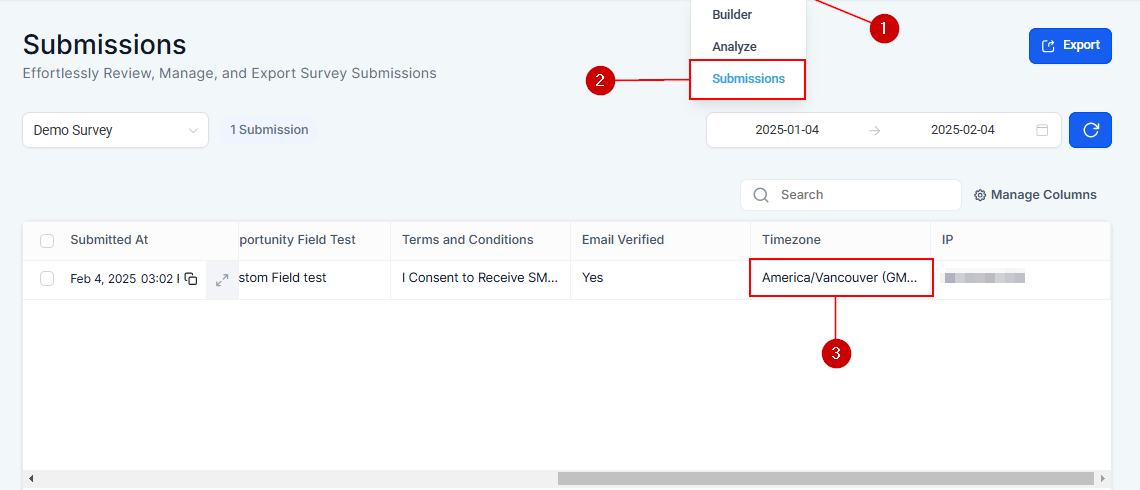
Primary Benefits #
- Precision in Communication: Messages are delivered at appropriate times, respecting clients’ local time zones.
- Effortless Contact Management: The CRM automatically captures and organizes contact time zones, eliminating manual data entry.
- Enhanced Workflow Efficiency: With time zones automatically integrated into workflows, managing global communications becomes more effective.
Practical Examples and Use Cases #
- Global Webinars: When participants register for a webinar, their time zones are automatically captured. This ensures reminder emails or SMS messages are sent at the right time, boosting attendance and engagement.
- International Campaigns: Schedule follow-ups or promotional messages based on the recipient’s local time, improving response rates.
- Customer Support: Automatically route support requests to agents available in the same time zone, reducing delays.
Automatic Time Zone Capture is a powerful tool for businesses operating in a global landscape. By automating time zone detection, it ensures your messages are delivered at the right time, every time. This not only enhances client satisfaction but also streamlines your workflow, allowing you to focus on what matters most—building meaningful connections.
Troubleshooting Tips and FAQs #
Q: What if the time zone doesn’t seem to be captured correctly?
- A: Ensure that the feature is enabled in the form or survey settings. If issues persist, verify the form’s configuration and the accuracy of the submission data.
Q: Can I manually adjust the time zone for a contact?
- A: Yes, contact time zones can be manually adjusted within their contact card if necessary.
What's your Reaction?
You have reacted on"Automatic Time Zone Capture on Forms and Surveys"
A few seconds ago


 Subscriptions
 My Orders
 My Wishlist
 Refer & Earn💸
 My Projects
 Conversations
 Website Services
 New Website Request
 Website Addons
 eCommerce Addons
 eCommerce Modules
 Software Development
 Graphic Design
 Video Production
 Content Writing
 Marketing Services
 Marketing Products
 Get a Marketing Plan
 Local SEO Audit
 Sales Automation
 Service Automation
 Operations Automation
 Marketing Automation
 Payments Automation
 Premium Modules
 Support Tickets
 Latest Updates
 Consultation Calls
 Tools & Extensions
 Tech Tips & Tricks
 Domains & Emails











