When running a business, getting documents signed by multiple people can be time-consuming and error-prone. Multi-recipient signing is designed to simplify this process by letting you assign specific parts of a document to different people.
Instead of managing multiple documents, you send a single document, and each recipient receives a secure, personalized link that guides them to their assigned sections for signing.
Key Benefits of Multi-Recipient Signature Support #
With multi-recipient signing, you can assign different signature fields within a single document to multiple recipients. This reduces the need for separate documents and saves time.
Also, each signer receives a personalized link guiding them to their assigned sections, making the process both intuitive and secure. Lastly, to ensure security and accountability, each signature action is tracked with details like IP address, location, and date/time for all signatories.
Creating A Document #
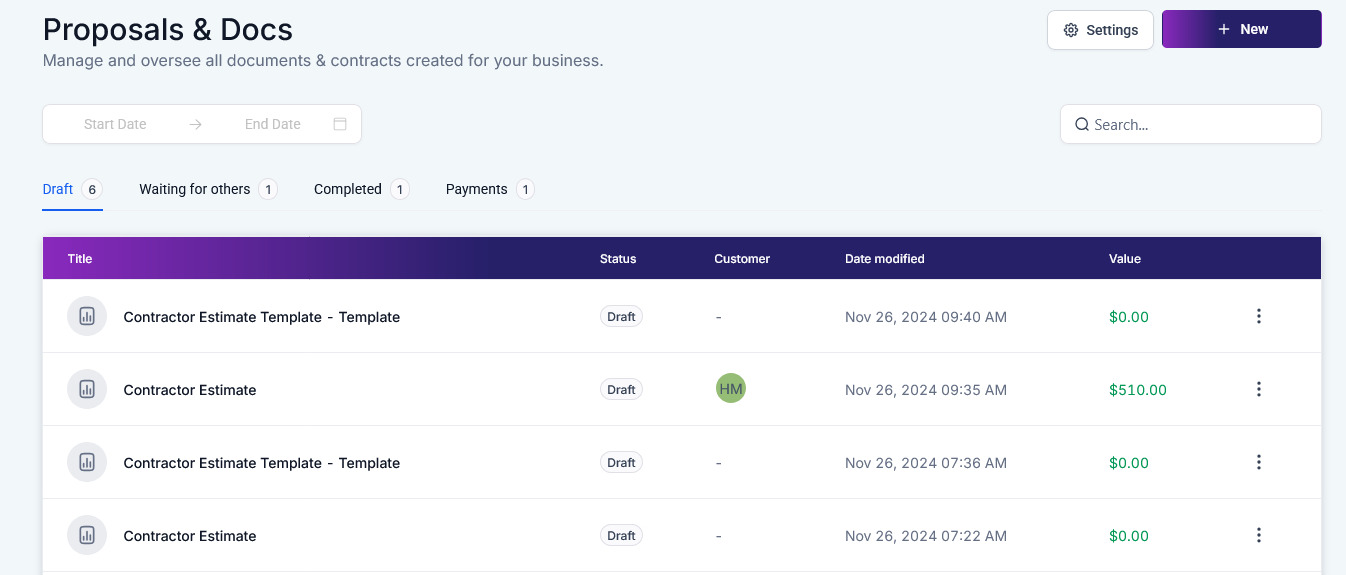
To start head to “Data Collect” > “Proposals & Docs” > “Templates” to manage your document and contract templates.
Once there, you can either create a new document by clicking the +New button or edit a draft that was previously created.
Assigning Signatures #
Once in the document, click the “+” icon on the top left side to add a signature element to your document. You can then add your preferred client in the Properties section which will pop up on the right side of the document.

Adding Recipients #
To add recipients, click the Person Icon. Use the Primary Client dropdown to select the primary recipient or delete them by clicking the Wastebin Icon. To include additional recipients, click the +Add More Recipient button, enabling multiple people to sign the document.

NOTE: An invoice is automatically generated for the primary client once all parties accept or sign the document.
Multi-recipient document signing is a powerful feature that simplifies the signing process, increases efficiency, and enhances security.
By using this feature, you save time and ensure accuracy in your document management. Whether you’re collecting signatures from clients, partners, internal team members, or multi-recipients.
Important Notes #
- Each recipient, including the business user sending the proposal, receives a unique link for their designated signature elements.
- Recipients can then securely sign their respective document portions using these links.
- Upon completion of the signing process by all participants, a signed PDF copy of the document is generated.
- A signature certificate is also created, capturing essential information such as IP address, location, and signing date/time for all recipients.
Troubleshooting and FAQs #
Q: What if a recipient did not receive their signing link?
- A: Verify the email address provided and resend the link. Ensure the recipient checks their spam or junk folder.
Q: Can I change the primary recipient after sending the document?
- A: Once a document is sent, the primary recipient cannot be changed. Ensure the correct primary recipient is selected before sending.
Q: How secure are the signing links?
- A: The signing links are encrypted and uniquely generated for each recipient, ensuring a secure and private signing process.
What's your Reaction?
You have reacted on"How to Set Up Multi-Recipient Document Signing"
A few seconds ago


 Subscriptions
 My Orders
 My Wishlist
 Refer & Earn💸
 My Projects
 Conversations
 Website Services
 New Website Request
 Website Addons
 eCommerce Addons
 eCommerce Modules
 Software Development
 Graphic Design
 Video Production
 Content Writing
 Marketing Services
 Marketing Products
 Get a Marketing Plan
 Local SEO Audit
 Sales Automation
 Service Automation
 Operations Automation
 Marketing Automation
 Payments Automation
 Premium Modules
 Support Tickets
 Latest Updates
 Consultation Calls
 Tools & Extensions
 Tech Tips & Tricks
 Domains & Emails









