This section will teach you more about the Consent checkbox for your Calendar settings. This allows users to include consent when collecting phone information. Users can add, modify, or remove the Terms and Conditions element as required, tailoring it to their specific needs.
Activate the Consent Checkbox #
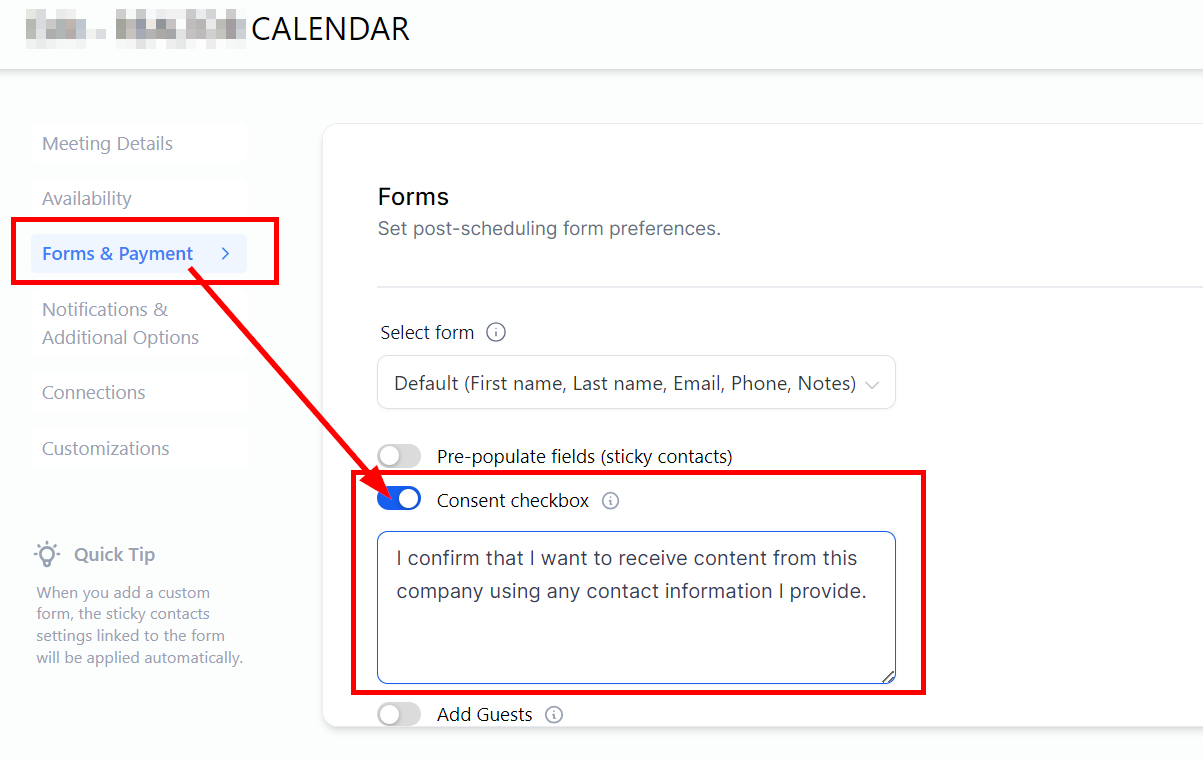
Navigate to the Calendar setting, click on the 3-dot menu, and select Edit.

In the Forms & Payment section, toggle on the consent Checkbox tab, and you can edit the info in the default consent form.
What's your Reaction?
You have reacted on"Consent Checkbox for A2P Compliance"
A few seconds ago


 Subscriptions
 My Orders
 My Wishlist
 Refer & Earn💸
 My Projects
 Conversations
 Website Services
 New Website Request
 Website Addons
 eCommerce Addons
 eCommerce Modules
 Software Development
 Graphic Design
 Video Production
 Content Writing
 Marketing Services
 Marketing Products
 Get a Marketing Plan
 Local SEO Audit
 Sales Automation
 Service Automation
 Operations Automation
 Marketing Automation
 Payments Automation
 Premium Modules
 Support Tickets
 Latest Updates
 Consultation Calls
 Tools & Extensions
 Tech Tips & Tricks
 Domains & Emails









