Popups are essential for engaging visitors, capturing leads, and guiding prospects through your sales funnel. Whether you want to offer a special discount, collect email addresses, or grab attention, adding a popup to your funnel can significantly enhance user experience and conversion rates. This guide will walk you through adding a popup on your funnel.
Adding a Popup on Your Funnel #
Begin by heading to the Funnels section within Funnels/Sites. There you can create a new site or choose an existing funnel from the list according to your needs.
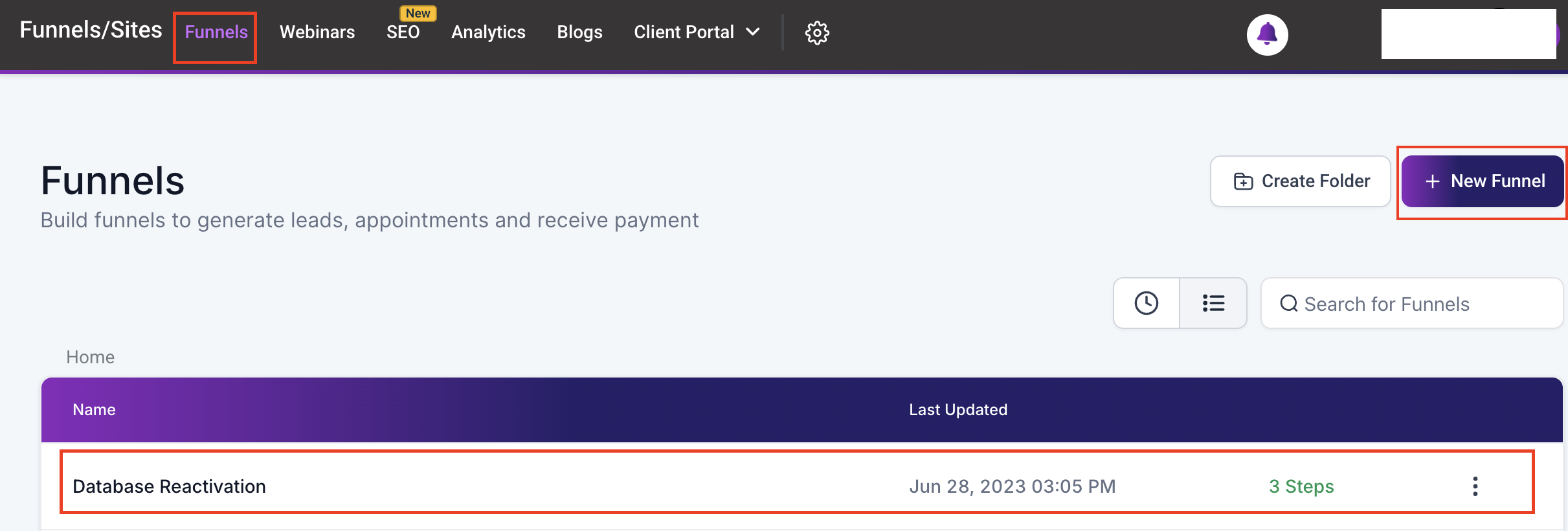
Next, you will need to add a new step or modify an existing step, either in a new tab or within the current tab.

Once you have accessed the funnel builder, click the “Popup Settings” button located in the upper panel. A modal will appear, enabling you to create the popup from scratch.

Start by inserting rows to structure the overall layout. Within each row, you can add columns to define the content’s positioning and alignment. Then, place various elements such as text, images, forms, and other components within the columns to tailor the popup’s content and functionality. This flexible approach allows you to design the popup to suit your specific goals and aesthetic preferences.

Adjusting Popup Settings #
Now that the popup has been added, proceed to configure the essential settings by clicking the “Popup Settings” button.

Adjust each setting to personalize the display of the popup and ensure that you select when the popup should appear from the “Show Popup On” dropdown.

The popup can also be triggered when the user clicks on elements such as images or buttons. To configure this option, open the settings for the desired element, then scroll to the “Actions” section to make the necessary adjustments.

After adjusting the settings, save your changes and preview the page to ensure that it is working as intended.
That’s all there is to it! Utilize this feature today to improve your marketing strategies.
Troubleshooting Tips #
- Always Save Changes: Ensure you save any changes made within the funnel before testing. Unsaved changes will not be reflected in the preview.
- Clear Cache: If changes don’t seem to take effect, try clearing your browser’s cache and refreshing the page.
- Review Trigger Settings: If the pop-up still doesn’t appear, review the trigger settings to ensure the pop-up is linked correctly to the intended action (e.g., clicking a button).
- Check the Pop-Up Settings: Navigate to the pop-up settings within the funnel. Look for any indicators of issues, such as a red exclamation mark next to the pop-up name, which suggests a problem with the settings.
- Adjust the Disable Pop-Up Option: Within the pop-up settings, locate the “Disable Pop-Up” option. If this option is turned on, it will prevent the pop-up from appearing. Simply turn OFF this option to enable the pop-up.
Frequently Asked Questions #
Q: Can I link a pop-up to multiple triggers?
- Yes, pop-ups can be configured to appear in response to various triggers, such as clicking different buttons or links on a page.
Q: Can I customize the appearance of my pop-up?
- Absolutely. The platform offers a range of customization options for pop-ups, including layout, colors, and content.
What's your Reaction?
You have reacted on"How to Add a Popup on Your Funnel/Website"
A few seconds ago


 Subscriptions
 My Orders
 My Wishlist
 Refer & Earn💸
 My Projects
 Conversations
 Website Services
 New Website Request
 Website Addons
 eCommerce Addons
 eCommerce Modules
 Software Development
 Graphic Design
 Video Production
 Content Writing
 Marketing Services
 Marketing Products
 Get a Marketing Plan
 Local SEO Audit
 Sales Automation
 Service Automation
 Operations Automation
 Marketing Automation
 Payments Automation
 Premium Modules
 Support Tickets
 Latest Updates
 Consultation Calls
 Tools & Extensions
 Tech Tips & Tricks
 Domains & Emails










