This guide will walk you through automating affiliate commission payments using PayPal. Before proceeding, ensure your PayPal account is connected. You can verify this by navigating to the Payments tab and selecting Integrations. If your account is connected, you’ll see the option to Manage it. If not, please connect your account first. For assistance, refer to our available articles on setting up PayPal integrations.
How It Works #
Initiating and Confirming Payouts #
Go to the Payout section of your Affiliate Manager inside of the marketing section.

Select the Approved for Payout tab, here you can select the affiliates for payout by checking the box next to their name.

To finalize the payout the actions will vary depending if you’re paying out to just one affiliate or several at the time. For individual payout click the $Pay button.

To pay multiple affiliates click on the Pay button on top, this will be for all affiliates you selected.

Review and confirm the details for the payout. If everything is correct click on Pay Now to finalize.

If you have not added a PayPal account for any of the affiliates click on Add Account to do it, once you add it click Pay Now to complete the action.

Completed Payments #
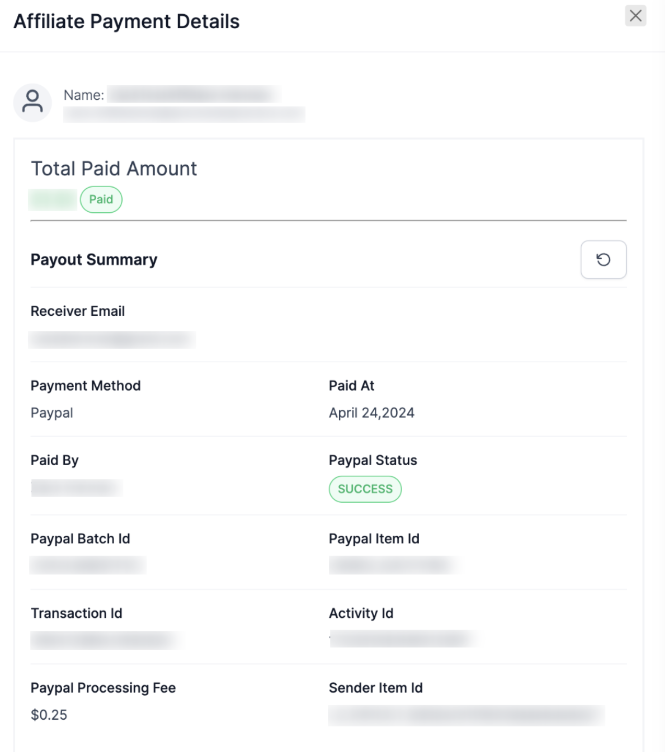
You can see the successful payments under the Paid tab, for more details on a payment click the three dots to view them.

You will then be able to see the details of the payment, including the payment date and amount, as well as its status.
That’s all there is to it. You can use this to advance the commission payout to your affiliates or ensure the commissions are paid on time.
Note: PayPal may require some time to process payments, during which the status may appear as “Pending.” Click the refresh icon for the most recent status to be displayed.
What's your Reaction?
You have reacted on"Automate Affiliate Payouts with PayPal"
A few seconds ago


 Subscriptions
 My Orders
 My Wishlist
 Refer & Earn💸
 My Projects
 Conversations
 Website Services
 New Website Request
 Website Addons
 eCommerce Addons
 eCommerce Modules
 Software Development
 Graphic Design
 Video Production
 Content Writing
 Marketing Services
 Marketing Products
 Get a Marketing Plan
 Local SEO Audit
 Sales Automation
 Service Automation
 Operations Automation
 Marketing Automation
 Payments Automation
 Premium Modules
 Support Tickets
 Latest Updates
 Consultation Calls
 Tools & Extensions
 Tech Tips & Tricks
 Domains & Emails









