With automatic version creation, simplified edit tracking, version previews, and the ability to restore previous versions, managing your forms and surveys has never been more efficient. You can effortlessly choose the most appropriate version for your current needs, making version management intuitive and user-friendly.
How It Works #
Automatic Version Creation #
Every time you save changes to a form or survey, a new version is automatically created. This ensures that each iteration is recorded, allowing you to monitor the evolution of your data collection tools with ease.
Edit Tracking Simplified #
Each edit is captured as a distinct version, facilitating detailed version tracking. You will never have to worry about losing track of your edits, as every change is meticulously documented.
Version Preview #
You can preview any previous version of your form or survey directly within the builder. To access the version preview, navigate the form or survey builder section within your CRM. Next, click on the “Versions” button.

Clicking on the versions icon allows you to view a list of all available versions, complete with timestamps and version numbers.

Restore Previous Versions #
Have you made a change you regret? Effortlessly restore your form or survey to any previous version with ease. This feature offers peace of mind, ensuring that you can always revert to an earlier version if necessary.
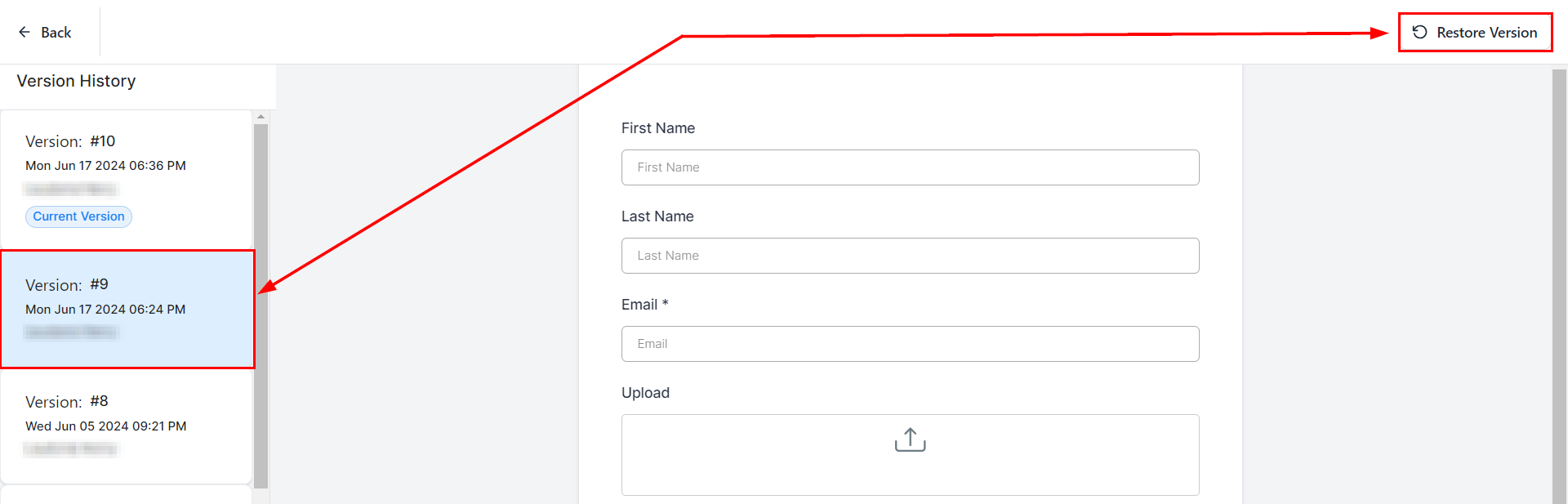
With these features, managing your forms and surveys is more efficient and reliable. Enjoy the peace of mind that comes with detailed version tracking and the ability to restore previous versions effortlessly.
FAQs #
Q: How does automatic version creation work?
- Automatic version creation occurs every time you save changes to your form or survey. A new version is generated, capturing all edits made since the last save.
Q: Is there a limit to the number of versions that can be saved?
- There is no set limit to the number of versions. However, to ensure optimal performance, it is recommended to periodically review and manage your versions.
Q: How do I restore a previous version?
- To restore a previous version, navigate to the versions list within the builder, select the desired version, and click on the restore option. Your form or survey will revert to the selected version.
Troubleshooting Tips #
Versions Not Appearing:
- Ensure that changes are being saved properly. If versions are not appearing, check your internet connection and save changes again.
Performance Lag:
- A large number of versions may cause performance lag. Periodically review and delete unnecessary versions to maintain optimal performance.
Version Preview Errors:
- If you experience errors while previewing versions, clear your browser cache and cookies, then try accessing the versions again.
What's your Reaction?
You have reacted on"Version History in Forms/Surveys"
A few seconds ago


 Subscriptions
 My Orders
 My Wishlist
 Refer & Earn💸
 My Projects
 Conversations
 Website Services
 New Website Request
 Website Addons
 eCommerce Addons
 eCommerce Modules
 Software Development
 Graphic Design
 Video Production
 Content Writing
 Marketing Services
 Marketing Products
 Get a Marketing Plan
 Local SEO Audit
 Sales Automation
 Service Automation
 Operations Automation
 Marketing Automation
 Payments Automation
 Premium Modules
 Support Tickets
 Latest Updates
 Consultation Calls
 Tools & Extensions
 Tech Tips & Tricks
 Domains & Emails









