Efficient access to opportunities and their associated audit logs can greatly improve the tracking and management of your opportunities. By optimizing workflow processes and facilitating rapid retrieval of critical data, these features enable enhanced operational confidence and efficiency. Whether it’s locating specific opportunities or recovering deleted ones, these tools are designed to streamline operations, ensuring that opportunity data remains both accessible and recoverable.
Why It Matters #
- Simplify Workflow: Easier access to Opportunities and audit logs allows you to navigate your opportunities with confidence and efficiency. This streamlined approach ensures that you can quickly find the information you need without unnecessary steps.
- Faster Recovery: The ability to quickly restore deleted opportunities minimizes downtime. This feature ensures that you can recover critical data promptly, maintaining the continuity of your operations.
Sharing Opportunities #
To collaborate effectively and ensure everyone has access to the necessary information, start by opening the desired opportunity in the Opportunities section of your account.

Copy the URL from your browser, as this provides a direct link to the specific opportunity you’re working on.

Sharing this link with your team ensures that everyone is on the same page, with easy access to the most up-to-date and relevant information. This practice enhances communication, streamlines decision-making, and helps prevent misunderstandings or missed details, fostering a more efficient and collaborative work environment.
Locating the Opportunity ID #
Seamlessly locate the opportunity ID at the bottom left of the opportunity dialog box.
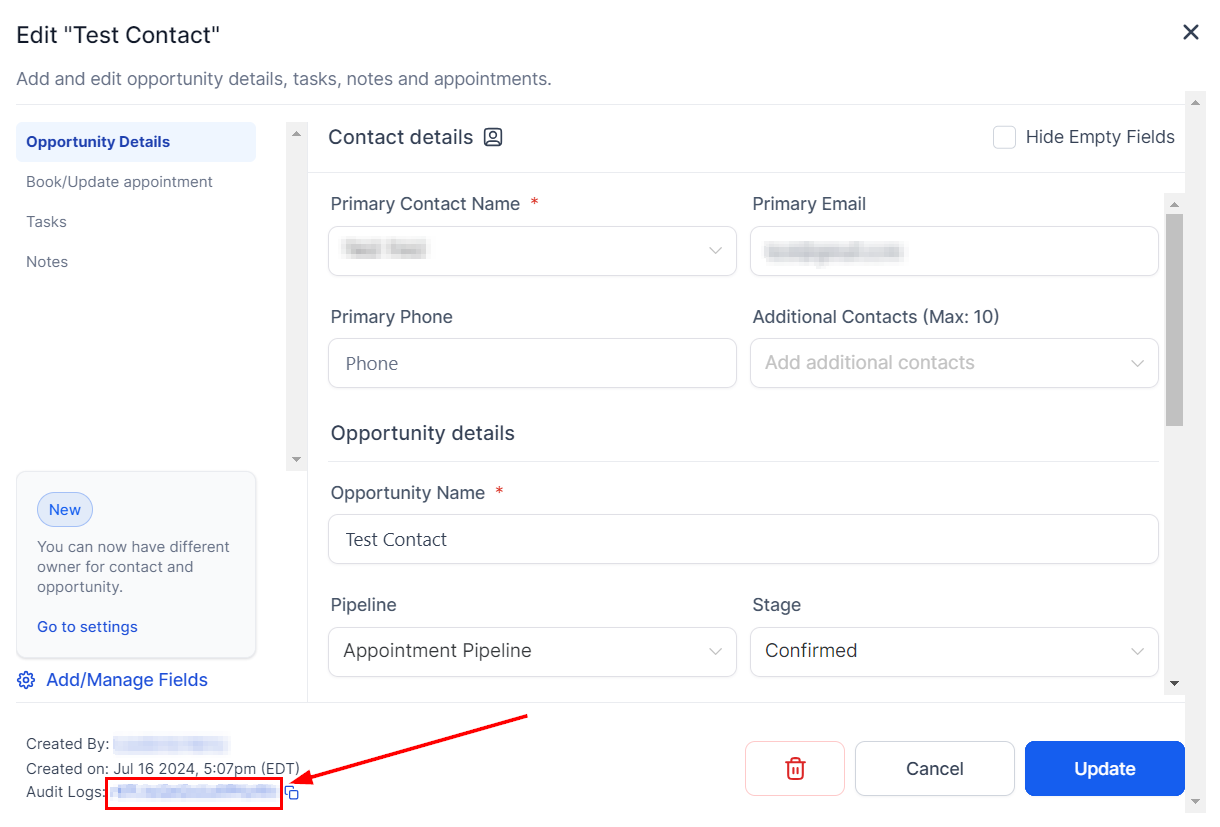
Copy the ID for future use, or click on the Opportunity ID to be redirected to the audit logs for that specific opportunity. This allows you to track changes and updates effortlessly.
Opportunity Restoration #
By selecting the “Restore Opportunities” option in the Opportunities menu, you can open the audit logs with deleted opportunities filtered.

This enables you to quickly identify and restore any deleted opportunities.

These features unlock enhanced opportunity management capabilities, providing you with unparalleled ease in tracking and restoring opportunities. With these tools, you can ensure that your opportunity data is always accessible and recoverable.
Frequently Asked Questions #
Q: Where can I find the Opportunity ID?
- The Opportunity ID is located at the bottom left of the opportunity dialog box. Clicking on it will redirect you to the audit logs for that specific opportunity.
Q: What information is available in the audit logs?
- The audit logs provide detailed information about changes and updates to each opportunity, including who made the changes and when they occurred.
Q: Can I filter the audit logs by specific criteria?
- Yes, the audit logs can be filtered to show specific types of changes or actions, making it easier to find the information you need.
Troubleshooting Tips #
Opportunity ID Not Visible:
- Ensure you are viewing the correct opportunity dialog box. If the Opportunity ID is still not visible, refresh the page and try again.
Unable to Access Audit Logs:
- Verify that you have the necessary permissions to view audit logs.
Audit Log Filters Not Applying:
- If filters are not working correctly in the audit logs, clear your browser cache and cookies, then reload the page.
What's your Reaction?
You have reacted on"Opportunity Management"
A few seconds ago


 Subscriptions
 My Orders
 My Wishlist
 Refer & Earn💸
 My Projects
 Conversations
 Website Services
 New Website Request
 Website Addons
 eCommerce Addons
 eCommerce Modules
 Software Development
 Graphic Design
 Video Production
 Content Writing
 Marketing Services
 Marketing Products
 Get a Marketing Plan
 Local SEO Audit
 Sales Automation
 Service Automation
 Operations Automation
 Marketing Automation
 Payments Automation
 Premium Modules
 Support Tickets
 Latest Updates
 Consultation Calls
 Tools & Extensions
 Tech Tips & Tricks
 Domains & Emails









