In this article, we will explore how the WhatsApp: Customer Service Window Check condition can be leveraged to create automated workflows and send free-form messages. This feature enables you to determine if an active Customer Service Window is open between your business and a customer. While the window is open, you can send unlimited free-form messages at no cost for up to 1,000 service conversations each month.
How to Use WhatsApp: Customer Service Window Check in Workflows #
To send free-form messages, first confirm if the customer service window is open. If it is open, you can send messages freely. Responding to a customer’s inbound message automatically opens a service conversation. Businesses are allotted 1,000 free service conversations monthly, significantly reducing messaging costs.
Navigate to Automation> Workflows > Create Workflow > Start from Scratch.

Rename the workflow as you see fit, then add a suitable workflow trigger.
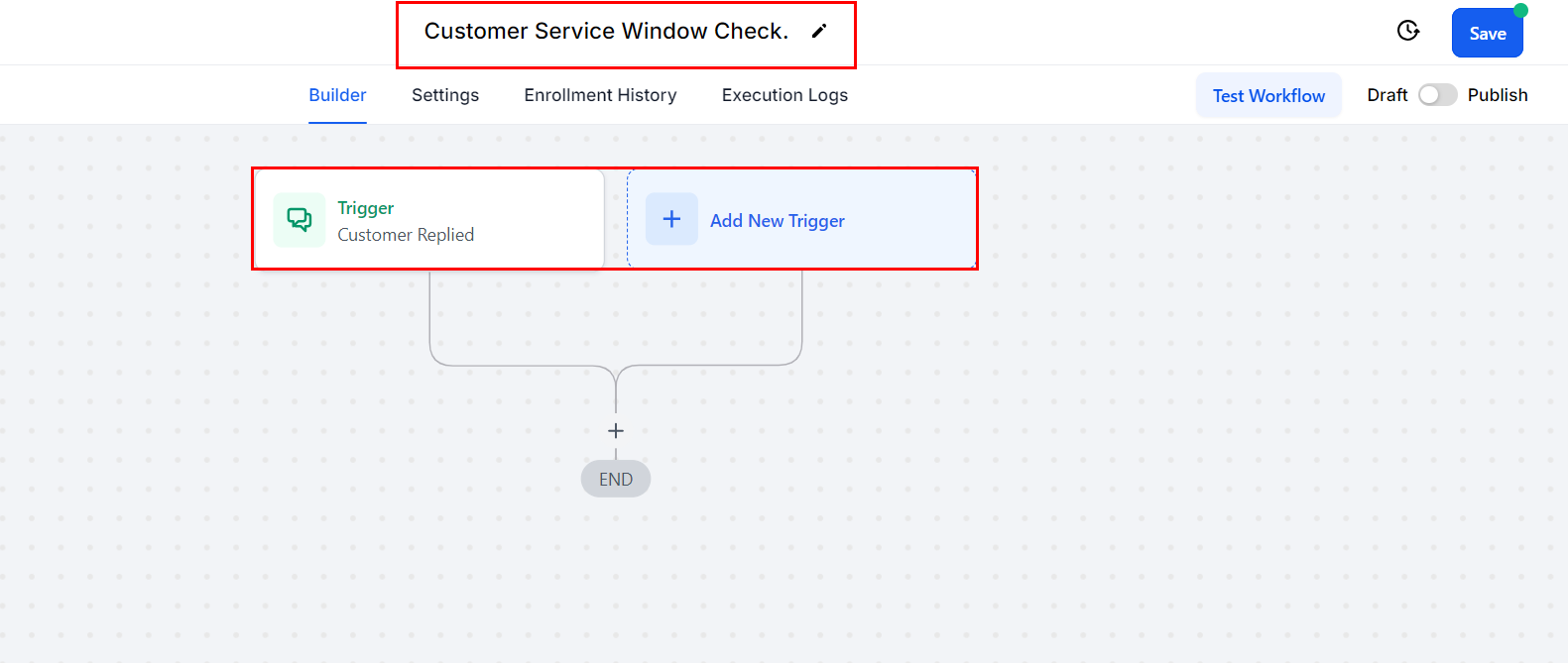
Add an action by clicking the plus icon and selecting “WhatsApp: Customer Service Window Check.” The WhatsApp Customer Service Window Check feature allows businesses to select from multiple connected WhatsApp numbers within a location when verifying the service window.
Only numbers with an “ACTIVE” status are available for selection, ensuring accurate workflow execution. This enables businesses to validate service windows for the correct phone numbers, streamline customer support, and efficiently manage multiple WhatsApp interactions.

Review the action details, then save it!

This action creates two branches: Open and Closed.
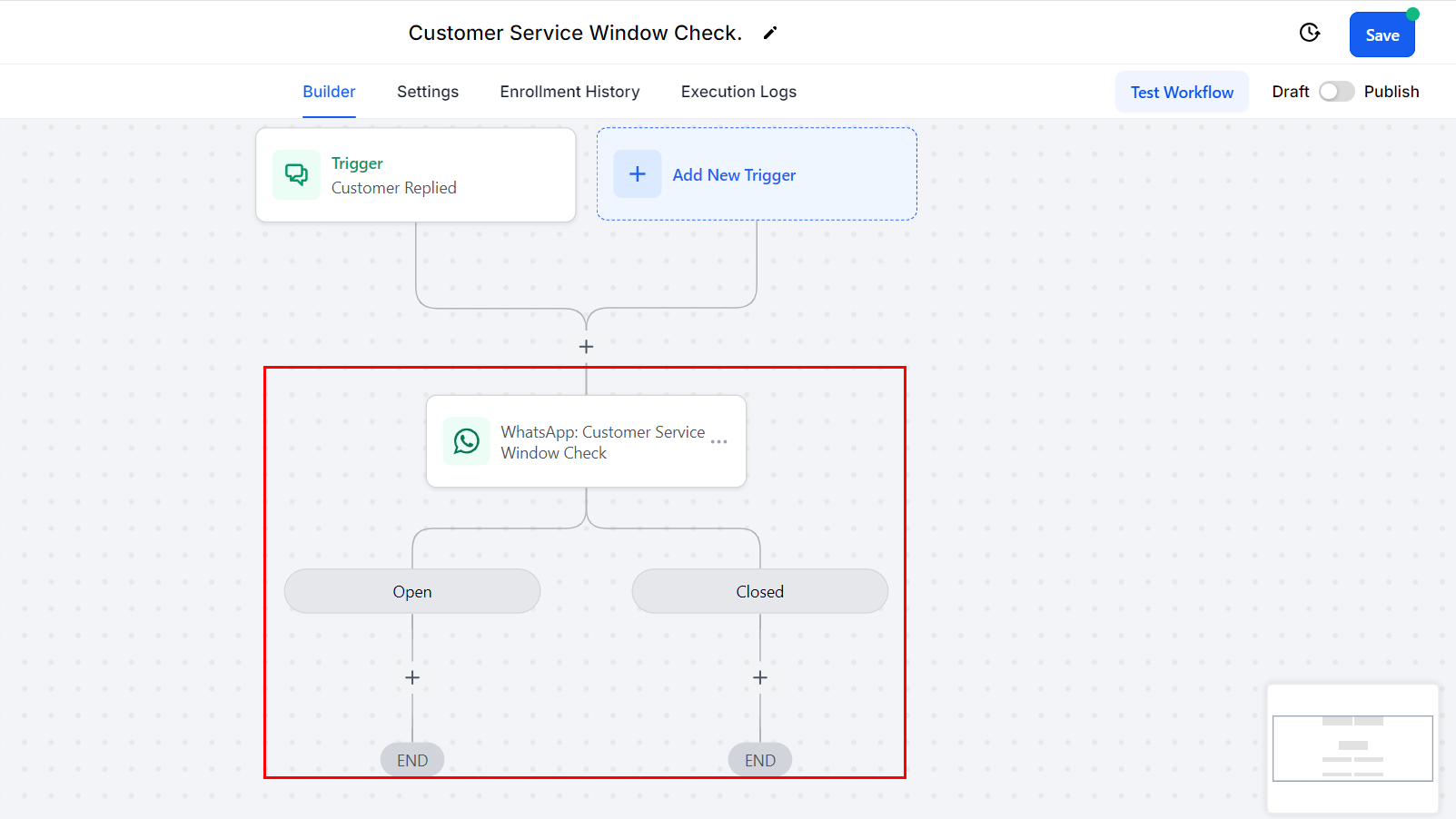
Open Branch #
Select the WhatsApp action and choose “None – Free-form message.” This allows you to send unlimited messages during the open window, using the 1,000 free service conversations.

Closed Branch #
Choose a WhatsApp action and select a marketing or utility template to initiate a new conversation.
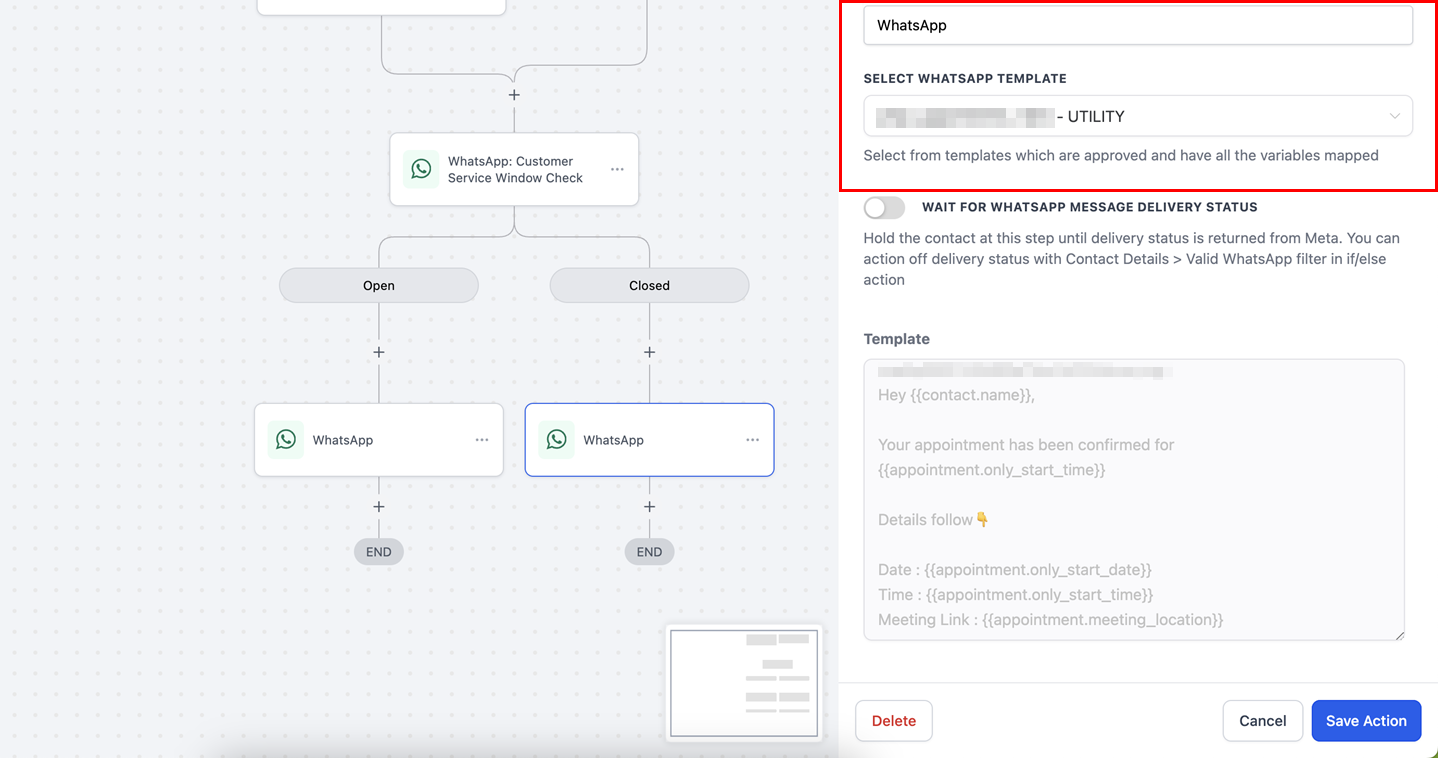
If the customer service window is closed, meaning the customer hasn’t replied within 24 hours, you can only send WhatsApp marketing or utility templates.
Understanding Conversations #
Conversations represent 24-hour message threads between your business and customers, forming the basis for WhatsApp pricing. Conversations can be initiated through free-form messages or by using pre-approved templates.
When are Conversations Opened? #
- Marketing, Utility, and Authentication Conversations
These conversations are opened when you send a pre-approved marketing, utility, or authentication template to a customer. If an existing conversation of the same category is open, no new conversation is initiated. Otherwise, a new 24-hour conversation starts.Example:
- Hour 0: A marketing conversation is opened by sending a promotion.
- Hour 4: The customer replies, opening a customer service window that allows you to send free-form messages for the next 24 hours.
- Hour 5: You send a free-form message. Since an open conversation (marketing) exists, no service conversation is initiated.
- Hour 25: After the marketing conversation expires, you send another message. This starts a new service conversation, lasting 24 hours.
2. Service Conversations
A service conversation begins when any message other than a template is delivered, and no open conversation of any category exists.
Example:
- Hour 0: A marketing conversation is initiated by sending a promotion.
- Hour 4: The customer replies, opening a customer service window for free-form messaging.
- Hour 5: You send a free-form message. Since a marketing conversation is open, no service conversation is initiated.
- Hour 25: After the marketing conversation expires, sending another message starts a new 24-hour service conversation.
3. Customer Service Window
A Customer Service Window is a 24-hour period initiated when a WhatsApp user messages your business. During this time, free-form messages can be sent without additional charges as long as the window remains open.
4. Free Tier Conversations
WhatsApp Business Accounts (WABA) receive 1,000 free service conversations per month across all business phone numbers. This allowance resets monthly. Service conversations are included in this free tier, but marketing, utility, and authentication conversations are not.
FAQs #
Q: What’s the difference between “None – Free-form message” and selecting a template?
- “None – Free-form message” allows you to send custom messages within the 24-hour service window. Templates, on the other hand, are pre-approved messages useful for initiating conversations outside the service window or for specific marketing or support purposes.
Q: Where can I check my free-tier conversation count?
- You can view your free-tier conversation count in Facebook Business Manager by selecting your WhatsApp account and then navigating to Account Tools > Insights.
Q: Can I combine WhatsApp with other channels like SMS or Email in workflows?
- Yes, workflows support the integration of WhatsApp with other channels such as SMS or Email, allowing for comprehensive automation sequences.
Q: Can I send messages outside the 24-hour customer service window using workflows?
- Yes, you can use approved WhatsApp templates to send messages after the customer service window has closed. Note that template-based messages will incur additional charges.
Q: What is a ‘Free Entry Point Conversation’ and how is it different from a regular conversation?
- A Free Entry Point Conversation occurs when a customer clicks a “Click to WhatsApp” ad or a Facebook Call-to-Action button. These conversations last 72 hours, during which you can send both free-form and template messages.
What's your Reaction?
You have reacted on"WhatsApp: Customer Service Window Check Action"
A few seconds ago


 Subscriptions
 My Orders
 My Wishlist
 Refer & Earn💸
 My Projects
 Conversations
 Website Services
 New Website Request
 Website Addons
 eCommerce Addons
 eCommerce Modules
 Software Development
 Graphic Design
 Video Production
 Content Writing
 Marketing Services
 Marketing Products
 Get a Marketing Plan
 Local SEO Audit
 Sales Automation
 Service Automation
 Operations Automation
 Marketing Automation
 Payments Automation
 Premium Modules
 Support Tickets
 Latest Updates
 Consultation Calls
 Tools & Extensions
 Tech Tips & Tricks
 Domains & Emails









