A payment plan is a structured agreement between a buyer and a seller that outlines the terms for paying for goods, services, or a product over time, rather than in a lump sum. This feature allows for customizable payment intervals, amounts, and invoicing dates, ensuring smooth and accurate billing for one-time payments.
Steps to Add a Payment Plan #
To start head to “Data Collect” > “Proposals & Docs” > “Templates” to manage your document and contract templates.
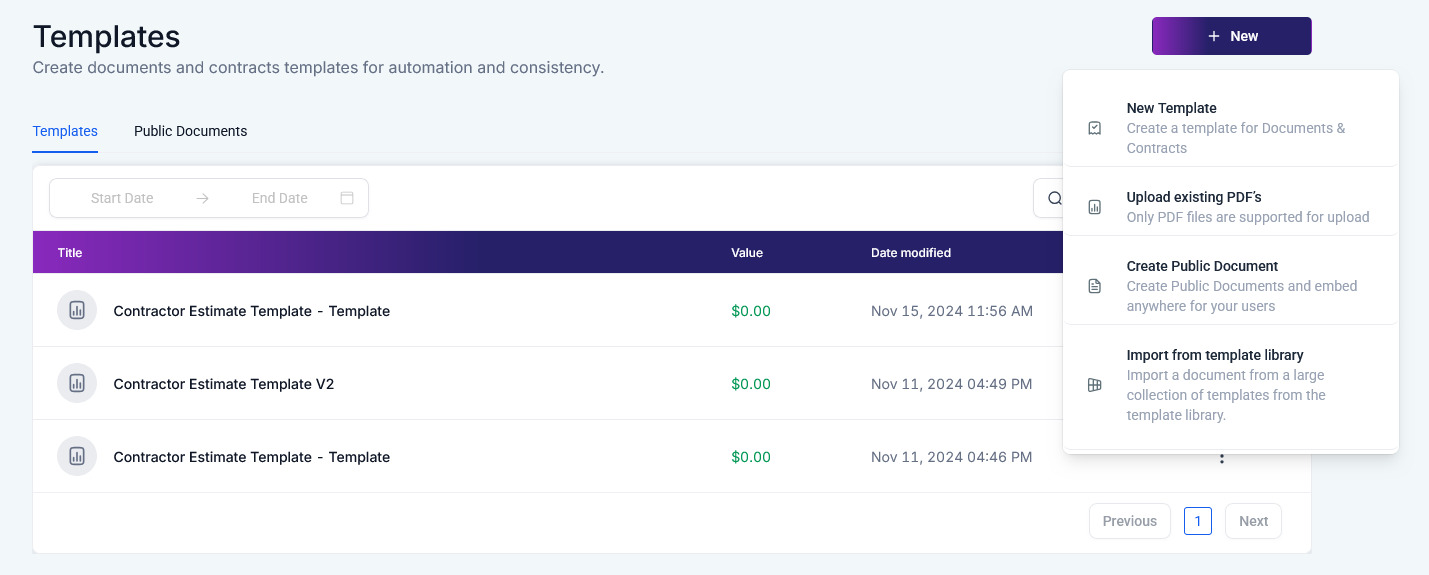
Open an existing document by clicking its name in the list, or click the +New option to create a template from scratch.

Add a Product List #
Drag and drop the Product List element into the builder, then proceed to add the relevant products. This step is crucial to ensure that all items contributing to the final cost are accurately captured.

Configure the Payment Plan #
From the left drawer, scroll down and select Add Payment Schedule (which will automatically open) or click on Add Payment Schedule within the product list.

The modal window will appear allowing you to:
- Choose whether the payment amounts will be based on percentages or fixed amounts.
- Choose either the signing date of the primary user or a custom date that fits your payment structure.
- Set payment intervals based on fixed times after the signing date or specific custom dates. The invoice due date will be the date of the last scheduled payment.
- Configure the payment structure based on the amounts you wish to be paid at each interval. Use the “Add Payment” button to add multiple payment intervals, giving your client more time to complete the purchase.
- View the remaining amount. The remaining balance will be automatically calculated and displayed under the total amount.

Once you’ve finalized the setup, click Save. The payment schedule details will appear on the document’s last product list.
Enable Auto Payments #
Optionally, you can activate the auto payment option to ensure automatic deductions for all subsequent payments, simplifying the payment process for the user.

By following these steps, you can efficiently manage payment schedules, configure flexible payment terms, and automate the payment process, enhancing both user experience and administrative efficiency.
✍️Important Notes #
- For fixed-date payments, subsequent payment dates will adjust according to the primary user’s signing date.
- If a payment is missed, the subsequent dates will automatically shift to accommodate the primary user’s signing date.
What's your Reaction?
You have reacted on"How to Set Up a Payment Plan in Documents &..."
A few seconds ago


 Subscriptions
 My Orders
 My Wishlist
 Refer & Earn💸
 My Projects
 Conversations
 Website Services
 New Website Request
 Website Addons
 eCommerce Addons
 eCommerce Modules
 Software Development
 Graphic Design
 Video Production
 Content Writing
 Marketing Services
 Marketing Products
 Get a Marketing Plan
 Local SEO Audit
 Sales Automation
 Service Automation
 Operations Automation
 Marketing Automation
 Payments Automation
 Premium Modules
 Support Tickets
 Latest Updates
 Consultation Calls
 Tools & Extensions
 Tech Tips & Tricks
 Domains & Emails









