Effectively managing membership comments is crucial for maintaining an engaging and orderly online learning environment. In this article, we will guide you through the processes of enabling, hiding, and locking comments for your lessons within different product categories. Additionally, we will explore how to manage comment visibility and the steps to delete or restore comments. This guide will help you maintain a controlled and interactive commenting system for your courses.
How to Manage Course Comments #
Navigate to the Course Products tab within Memberships, then select an existing product or create a new one.

Click on the Comments section.

Comment Visibility #
Configure the default settings for comment behavior when a learner submits a new comment within the product. Available options include:
- Instructor Only: The comment will be visible only to the course creator.
- Public: The comment will be visible to all students and the course creator.
- Both (User Selection): The user can select the visibility when commenting.

To configure comments for all lessons within a category, choose the appropriate option from the dropdown menu for each category to enable, hide, or lock comments.

To set comment visibility for selected lessons within a category, select the desired option from the visibility dropdown for the specific lessons within the category.

Managing Comments for All Products #
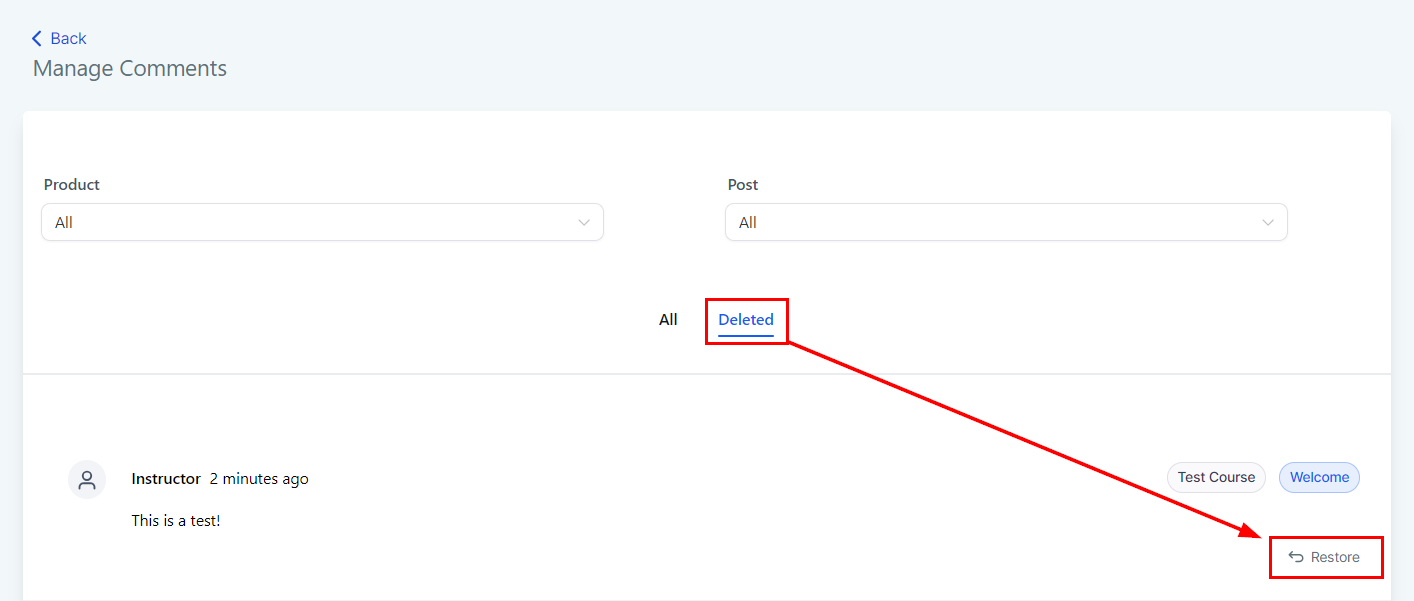
Access the Comments Manager for your products in the Products tab. Here, you can view all comments that have been posted or deleted across all products or specific lessons.

Deleting a Comment #
From the Comments Manager, find and select the comment you wish to delete, then Click Delete.

Restoring a Deleted Comment #
Navigate to the “Deleted” tab, find the comment you wish to restore, and then click the “Restore” button to recover it.
Editing and Replying to a Comment #
Furthermore, you have the option to edit a comment to modify the text, attach media, or tag members. You can also reply to the comment by selecting the “Reply” button.

By following this guide, you can effectively manage comments on your membership site, fostering a more organized and engaging learning environment.
Frequently Asked Questions #
Q: Can I enable comments for individual lessons instead of an entire category?
- Yes, you can enable comments for specific lessons within a category through the Comments section in the Products tab.
Q: What happens to existing comments when I hide the comment box?
- When you hide the comment box, existing comments will not be visible on the page.
Q: Can students still view existing comments if the comment box is locked?
- Yes, students can view existing comments even if the comment box is locked, but they will not be able to add new comments.
Troubleshooting Tips #
Comments Not Visible
- Ensure that comments are not set to hidden and check the visibility settings (User Only vs. Public).
Unable to Restore Deleted Comments
- Verify that you are in the Deleted tab within the Manage Comments section.
Comment Visibility Issues
- Double-check the visibility settings for each comment and ensure the appropriate option is selected in the dropdown menu.
What's your Reaction?
You have reacted on"Manage Your Course Comments"
A few seconds ago


 Subscriptions
 My Orders
 My Wishlist
 Refer & Earn💸
 My Projects
 Conversations
 Website Services
 New Website Request
 Website Addons
 eCommerce Addons
 eCommerce Modules
 Software Development
 Graphic Design
 Video Production
 Content Writing
 Marketing Services
 Marketing Products
 Get a Marketing Plan
 Local SEO Audit
 Sales Automation
 Service Automation
 Operations Automation
 Marketing Automation
 Payments Automation
 Premium Modules
 Support Tickets
 Latest Updates
 Consultation Calls
 Tools & Extensions
 Tech Tips & Tricks
 Domains & Emails









