A Lookalike Audience targets a new group of people whose characteristics align with your existing customer base. This audience is created using a custom audience as its source, allowing your ads to reach people who are similar to your current customers. This article will provide a detailed guide on how to create Lookalike Audiences and utilize them during the campaign creation process in Ad Manager.
Locating the Lookalike Audience Option #
You can create Lookalike Audiences during the second step of the campaign creation process, labeled ‘Budget and Audience,’ you will find the Intended Audience section under Audience Controls.
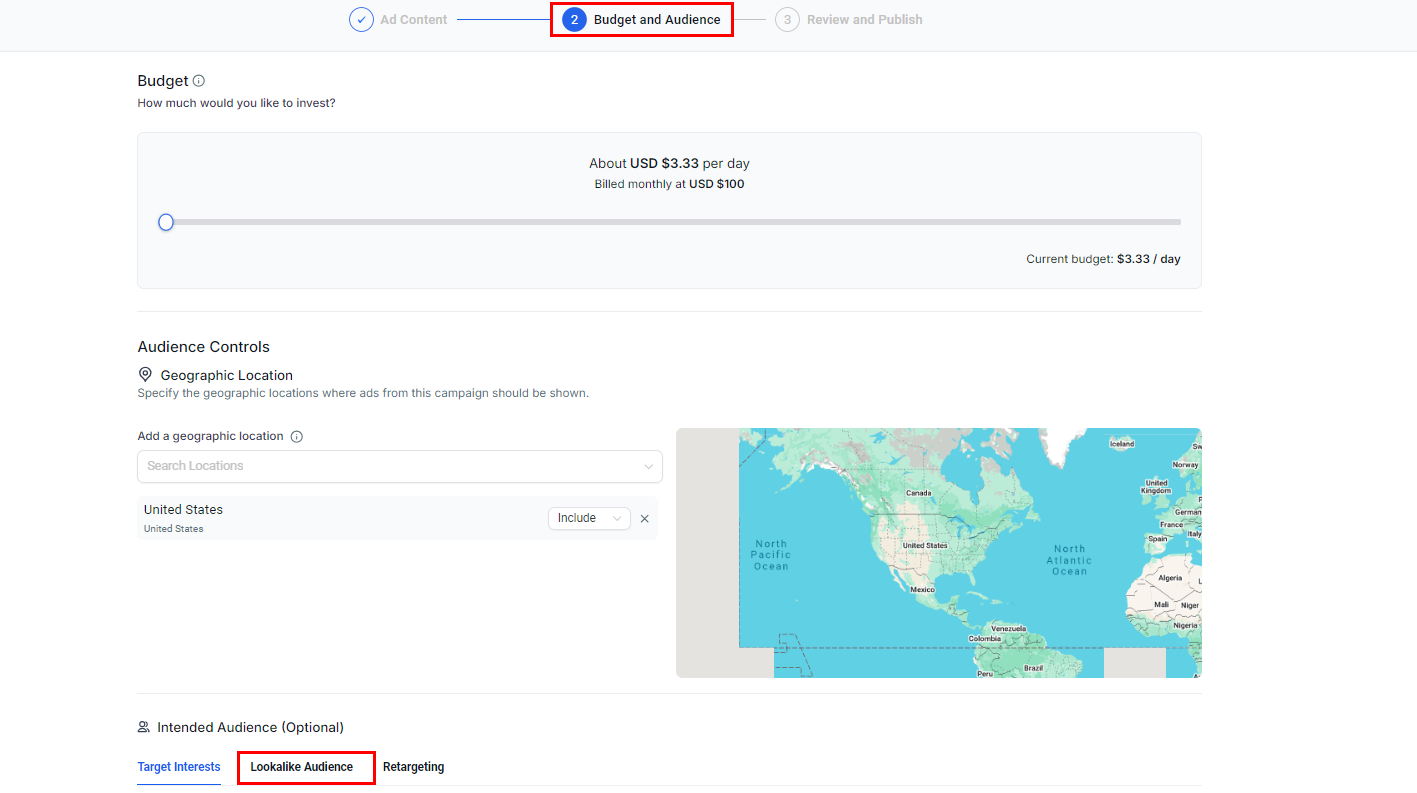
By clicking on the dropdown to ‘Create new or select lookalike audience,’ the first option available is “Create a Lookalike Audience.”

Creating a Lookalike Audience #
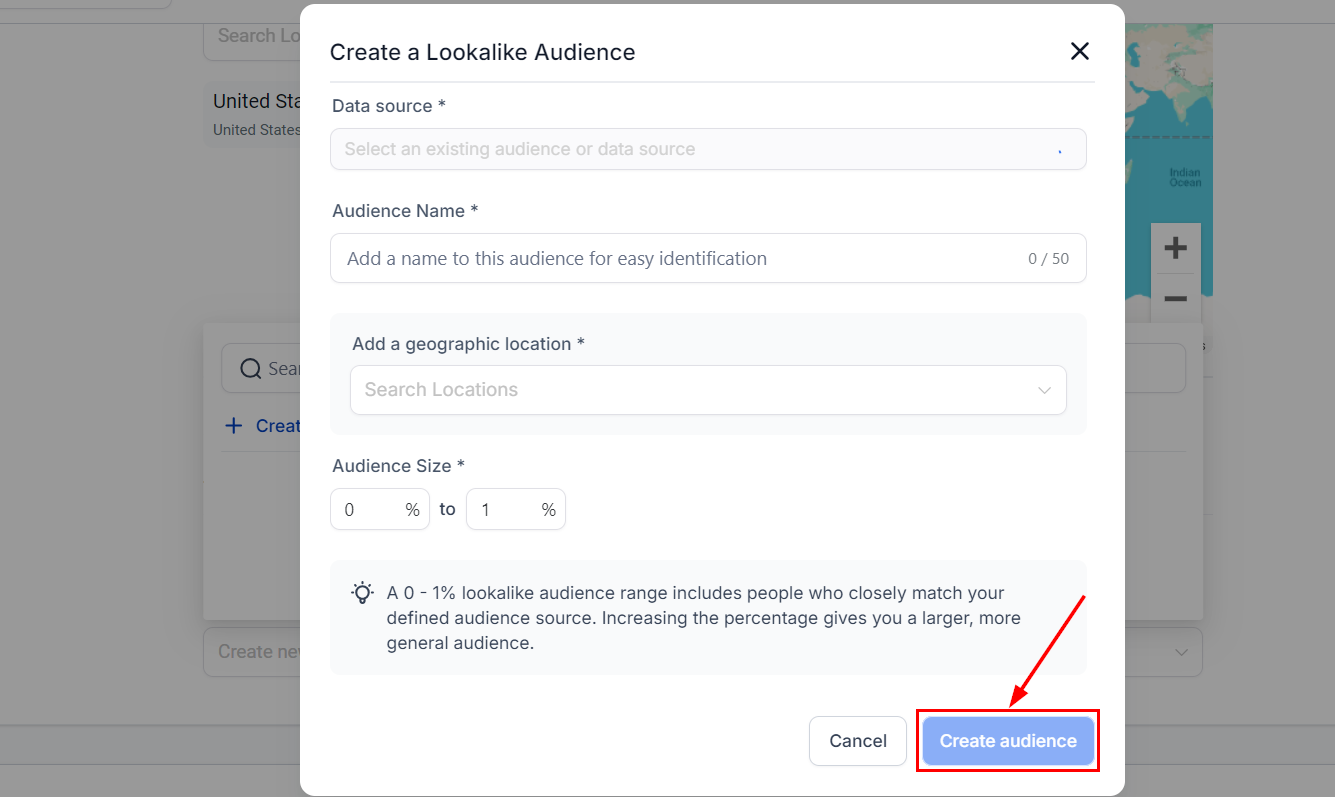
When you click on the ‘Create a Lookalike Audience’ button, a modal dialog will open, guiding you through the process of defining the audience.
Data Source #
Select one of the following as the source for your Lookalike Audience:
- Page: The dropdown will display all the pages integrated with Ad Manager, from which you can select one.
- Custom Audiences: The dropdown will list all the custom audiences within Ad Manager, allowing you to select one.

Audience Name #
Assign a name to your audience for easy identification.

Geographic Location #
Choose a country where you want to find people similar to your source audience. Note that only countries are supported at this time; cities, neighborhoods, and provinces are not available for selection.

Audience Size #
Define the audience size within a range of 0-10%. A 0-1% range includes individuals who closely match your source audience while increasing the percentage broadens the audience.

Create Audience #
After entering all the necessary details, click “Create Audience.” The newly created Lookalike Audience will appear in the dropdown but may not be ready for immediate use.
Understanding Audience States #
The following are the possible states of your Lookalike Audience:
- Ready: The audience is fully created, meets all Facebook specifications, and is ready for use in any campaign.
- Populating: The audience is still being created, a process that takes between six and 24 hours. Once complete, the status will change to Ready, and the audience will refresh every 3-7 days while active.
- Audience Not Created: This indicates that the source audience was too small to create a Lookalike Audience. You may need to create a new source audience.
Once your Lookalike Audience is successfully created and ready, it will appear in the Lookalike Audience dropdown list, available for use in your campaigns.
What's your Reaction?
You have reacted on"How to Create Lookalike Audiences in Ad Manager"
A few seconds ago


 Subscriptions
 My Orders
 My Wishlist
 Refer & Earn💸
 My Projects
 Conversations
 Website Services
 New Website Request
 Website Addons
 eCommerce Addons
 eCommerce Modules
 Software Development
 Graphic Design
 Video Production
 Content Writing
 Marketing Services
 Marketing Products
 Get a Marketing Plan
 Local SEO Audit
 Sales Automation
 Service Automation
 Operations Automation
 Marketing Automation
 Payments Automation
 Premium Modules
 Support Tickets
 Latest Updates
 Consultation Calls
 Tools & Extensions
 Tech Tips & Tricks
 Domains & Emails









