The Accordion widget is a versatile tool designed to enhance user experience by allowing visitors to access specific information quickly. Instead of scrolling through extensive content, users can click on questions or titles of interest, making it ideal for FAQs, product highlights, or event details.
Adding the Accordion Widget #
- Access the Widgets Panel:
- Click on Widgets in the side panel.
- Add the Widget:
- Search for Accordion and drag it to your desired location on the canvas.
Content Editor #
To customize content within the accordion:
- Accessing the Content Editor:
- Right-click the widget and select Edit Content
- Accordion Setup Options:
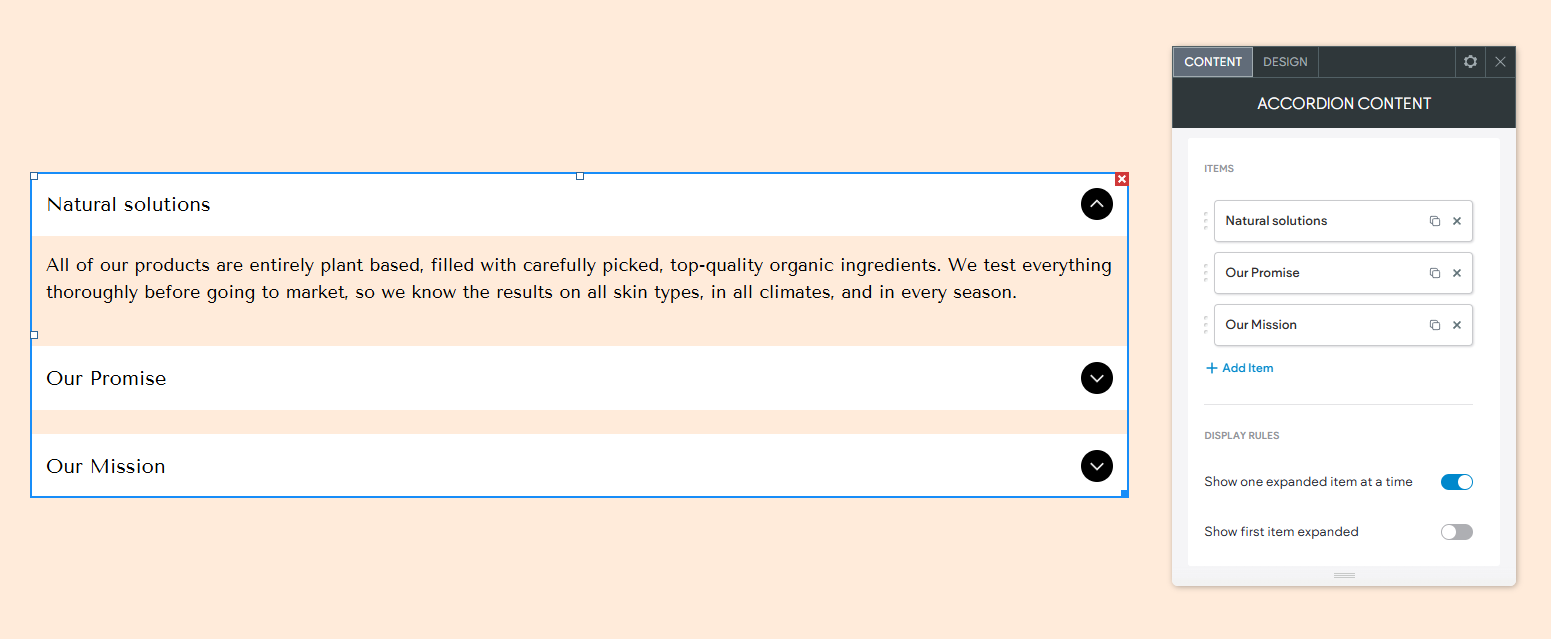
- Items: Click an item to edit its content, duplicate it, or click +Add Item to add new ones.
- Display Rules: Choose whether to show one expanded item at a time or allow multiple items to be expanded simultaneously. Decide if the first item should be expanded by default.
- SEO Enhancements:
- Enable FAQ Schema: Turn on this option to generate FAQ schema markup for better search visibility.
Individual Items Settings #
- Textual Content: Customize the title/question and description with various text formatting options.
- Button Visibility: Hide unnecessary buttons by clicking the eye icon.
- Media Options: Add images or videos and manage alt text for accessibility.
- Title Icon: Depending on your layout, add unique icons next to item titles for visual cues.
Design Editor #
To refine the look of your accordion:
- Accessing the Design Editor:
- Right-click the widget and select Edit Design
- Design Settings:
- Layouts: Choose from available layouts to best display your content.
- Title Styling: Adjust heading types (h1-h6) and style text.
- Expansion Icon: Customize the size, color, and background of the expansion icon.
- Media: Configure settings if images are part of your accordion content.
- Frame Settings: Adjust spacing and other settings for the frame.
Note: Changing the layout might override some settings, so review and adjust settings as needed. Ensure design settings are device-specific for optimal viewing across all devices.
By incorporating the Accordion widget into your Turnkey Websites™ site, you can create a streamlined, interactive experience that allows visitors to explore content efficiently.
What's your Reaction?
You have reacted on"Utilizing the Accordion Widget"
A few seconds ago


 Subscriptions
 My Orders
 My Wishlist
 Refer & Earn💸
 My Projects
 Conversations
 Website Services
 New Website Request
 Website Addons
 eCommerce Addons
 eCommerce Modules
 Software Development
 Graphic Design
 Video Production
 Content Writing
 Marketing Services
 Marketing Products
 Get a Marketing Plan
 Local SEO Audit
 Sales Automation
 Service Automation
 Operations Automation
 Marketing Automation
 Payments Automation
 Premium Modules
 Support Tickets
 Latest Updates
 Consultation Calls
 Tools & Extensions
 Tech Tips & Tricks
 Domains & Emails









